Top 5 Survey Use Cases That Drive Outcomes in Workday
Collecting feedback is step one. The real question is whether it changed anything. These are the five Workday survey use cases that most reliably lead to outcomes, with the trigger, the metric and sample questions for each.
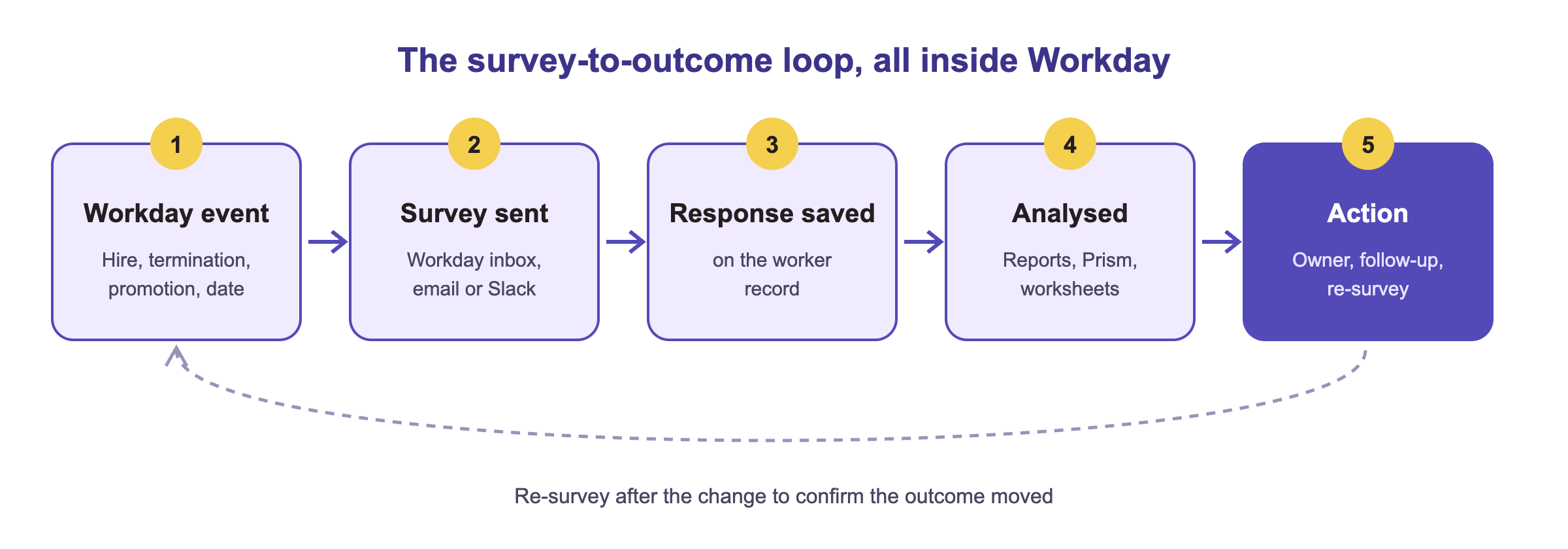
Collecting feedback is step one. The real question is whether the feedback produced an outcome. Too often survey data ends up in a silo: exported to Excel, reviewed once, forgotten. The fix is to run surveys where the HR data already lives, trigger them from the moments that matter, and close the loop with an owner and an action.
Short answer
The five Workday survey use cases that most often lead to measurable outcomes are engagement, onboarding feedback, exit, annual employee and inclusion (DEI) surveys, each triggered from a Workday event and analysed against worker data.
5 surveys, 5 outcomes
Survey
When Workday sends it
Outcome it drives
Engagement
Quarterly pulse or org change
Spot disengagement before it becomes a resignation
Onboarding feedback
Day 30 and day 90 after hire
Better new-hire experience, lower 90-day turnover
Exit
Termination business process
Patterns and root causes of attrition
Annual employee
Fixed date plus pulses
Sentiment tracked all year, not once
Inclusion (DEI)
Scheduled, security-restricted
Inclusion measured, leaders accountable
Each use case in detail
Pick a survey on the left to see its Workday trigger, what to measure and a few sample questions.
Trigger in Workday: a recurring schedule (quarterly pulse) or an organization change.
Outcome: spot disengagement before it turns into a resignation.
What to measure: engagement score by team and manager, trend since the last pulse, participation rate.
Sample questions
How likely are you to recommend this team as a place to work?
These five use cases were the focus of our March 2026 OnSurvey webinar, aimed at HR leaders focused on retention and engagement, HRIS teams evaluating survey solutions and people analytics professionals.
What are the most effective employee survey use cases in Workday?
Engagement pulses, onboarding feedback, exit surveys, the annual employee survey and inclusion (DEI) surveys. Each maps to a Workday event or schedule and to a clear outcome such as lower early turnover or fewer regretted exits.
Can Workday trigger surveys automatically?
Yes. With a Built-on Workday app such as OnSurvey, survey sends can be tied to business processes like hire, termination or promotion, or to dates such as day 30 after hire.
How do you turn survey results into outcomes?
Analyse responses against worker data, assign an owner and an action to each theme, then re-survey to check the score moved. Keeping results inside Workday reports makes that loop faster.
How do you keep DEI survey results confidential?
Restrict access through Workday security groups and only report on groups above a minimum size, so individual answers cannot be identified.