

Every HR leader knows the frustration. You spend weeks designing the perfect employee survey with thoughtful questions, clear purpose, leadership buy-in and then half your workforce ignores it.
The culprit isn’t the survey itself. It’s the personalization.
When an employee opens an email that starts with “Dear Team Member” or “Hi Employee,” their brain files it under “mass blast” before they’ve even read the second line. It feels impersonal, automated, and easy to ignore. And in most cases, they do exactly that.
True personalization goes beyond inserting a first name into a subject line. It means the entire communication reflects who the employee is, where they sit in the organization, and why their specific feedback matters right now.
Consider the difference between these two survey invitations:
Generic: “Please take a few minutes to complete our quarterly engagement survey. Your feedback is important.”
Personalized: “Hi Sarah, you’ve been with Acme Corp for 90 days now — congratulations! Your manager, David, and the Engineering team would love to hear how your onboarding experience has been so far.”
The second version tells Sarah three things instantly: we know who she is, we know her context, and we’re asking for her perspective specifically.
Sample Survey with Personalization
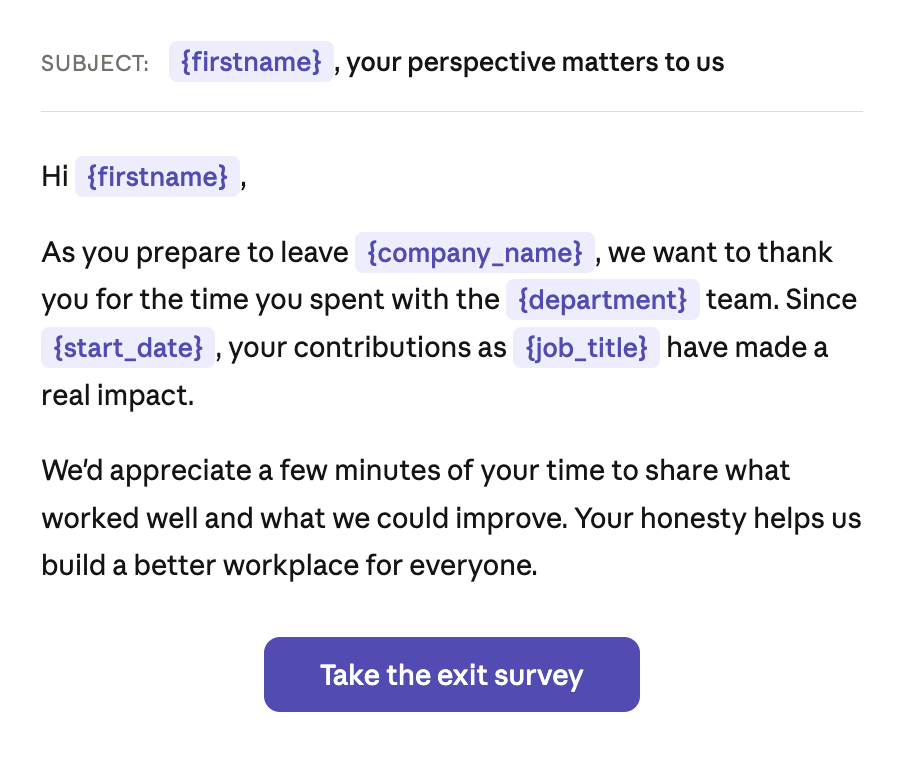
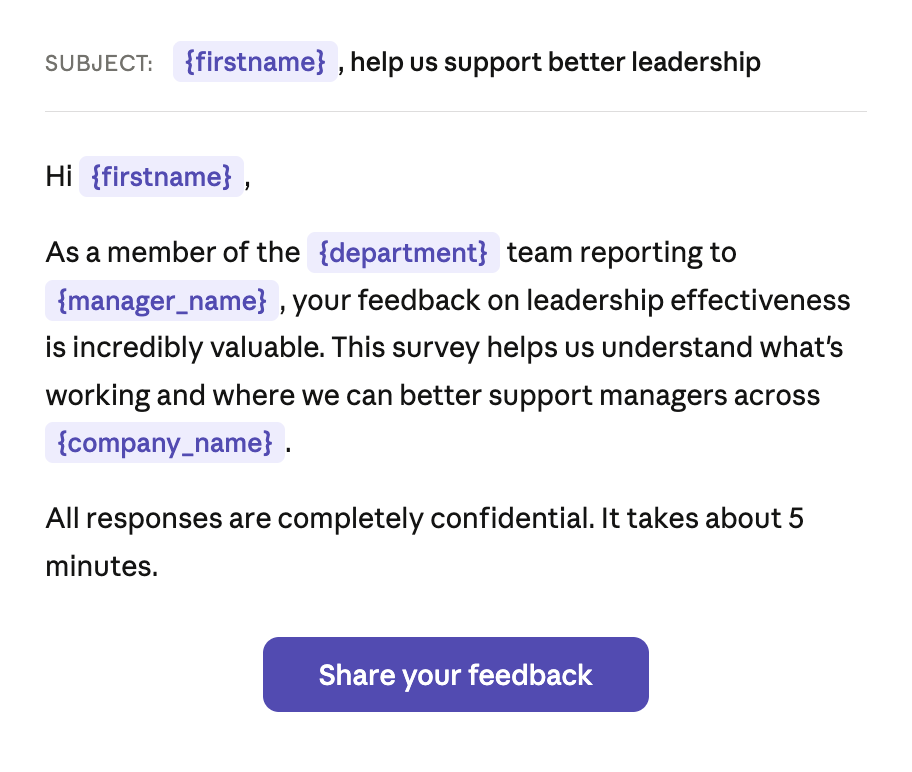
OnSurvey now supports dynamic variable insertion in survey emails and text messages, powered by live Workday data. Because OnSurvey is built natively on Workday, it can pull employee attributes directly into your survey communications based on the custom report configuration.
Here’s what that looks like in practice. When composing a survey invitation, you can insert variables like:
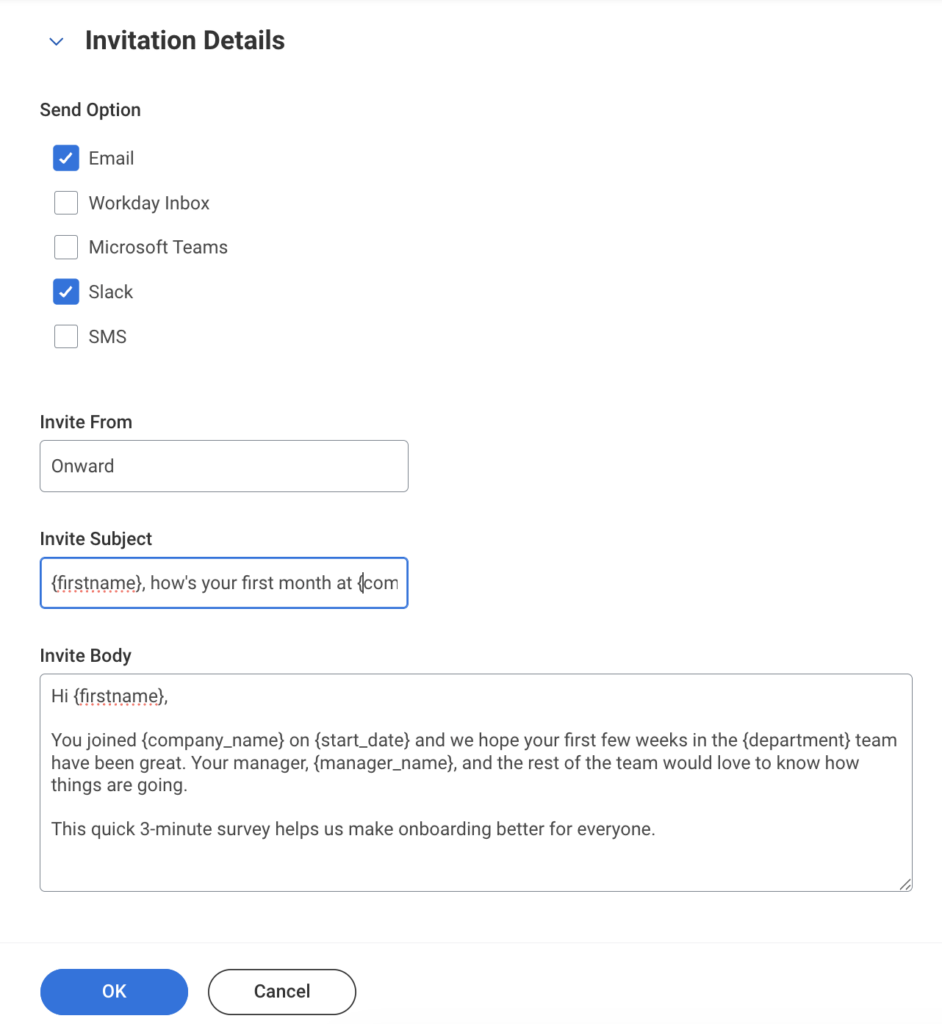
These variables resolve dynamically for every recipient. One template becomes thousands of personalized messages, each one reflecting the employee’s actual profile in Workday.
Dynamic personalization isn’t just a nice-to-have. For certain survey types, it fundamentally changes the quality of the experience and the data you collect.
Onboarding surveys become milestone moments. Instead of a generic check-in, new hires receive a message that acknowledges their start date, their manager, and their team — reinforcing that the organization is paying attention to their journey.
Exit surveys gain a human touch at a sensitive time. Addressing a departing employee by name and acknowledging their tenure signals respect, which increases the likelihood of candid, constructive feedback.
Pulse surveys feel less like corporate spam. When a recurring survey greeting mentions the employee’s department or role, it reminds them that their specific context matters to the people reading the results.
Manager effectiveness surveys can reference the manager by name, making the ask feel targeted and relevant rather than broad and impersonal.
Personalization is powerful, but it works best when applied thoughtfully. Here are a few principles to keep in mind:
Use context, not just names. Dropping in a first name is table stakes. The real impact comes from referencing the employee’s situation — their tenure, their team, their manager, their location. These details signal that the survey is relevant to them.
Match the tone to the survey type. An onboarding check-in can be warm and congratulatory. An exit survey should be respectful and appreciative. A pulse survey can be quick and conversational. Let the variables support the tone, not override it.
Don’t over-personalize. Including every available variable in a single message can feel invasive rather than thoughtful. Pick two or three that are genuinely relevant to the survey’s purpose.
Test before you send. Preview how your personalized messages render for different employee profiles — a new hire, a tenured leader, someone in a different country. Make sure the variables resolve cleanly in every scenario.
Extend personalization to SMS. Survey invitations aren’t limited to email. OnSurvey supports dynamic variables in text messages too, meeting employees on the channel where they’re most responsive.
Please give it a try and let us know your feedback.