
Snowflake is where a lot of organizations keep their operational metrics e.g equipment registries, meter readings, customer records, work order history. This post walks through getting that data into Assets using OnLink.
We’ll cover: authenticating to Snowflake, executing the query through the SQL API, and mapping the result set to Asset attributes.
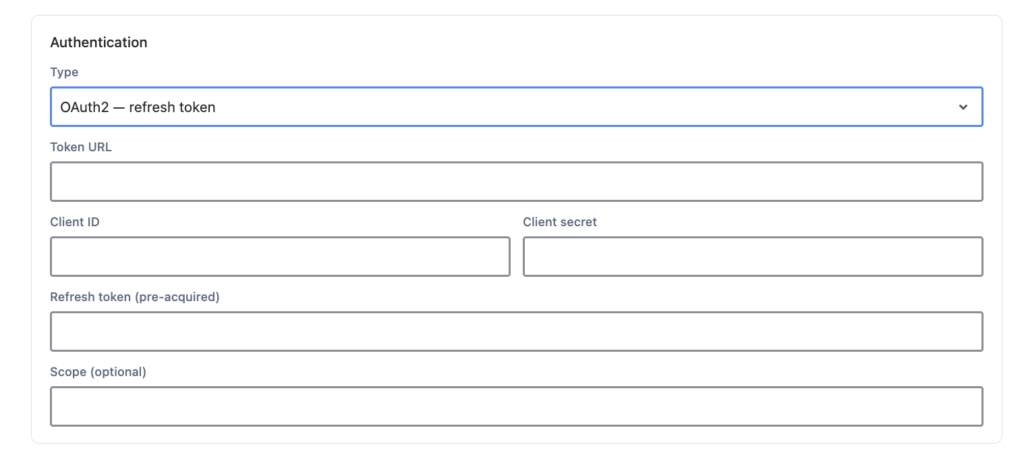
OnLink supports OAuth authentication to Snowflake.
Snowflake’s SQL API accepts three authentication methods — OAuth, key-pair (JWT), and workload identity federation. OnLink uses OAuth, which means you configure an OAuth integration in Snowflake, OnLink obtains a token, and that token rides along on every API request.
Reference: Authenticating to the server — Using OAuth
Set up OAuth in Snowflake. Snowflake supports both Snowflake OAuth (built-in authorization server) and External OAuth (Okta, Entra ID, Ping, and other providers). See Snowflake’s Introduction to OAuth for creating the security integration and obtaining a token.
Verify the token works before wiring it into OnLink:
snow connection test --account <account_identifier> --user <user> --authenticator=oauth --token=<oauth_token>
Send the token on every request. Snowflake expects these headers:
Authorization: Bearer <oauth_token>
X-Snowflake-Authorization-Token-Type: OAUTH
The X-Snowflake-Authorization-Token-Type header is optional — Snowflake will inspect the token and infer the type — but setting it explicitly avoids ambiguity and makes troubleshooting easier.
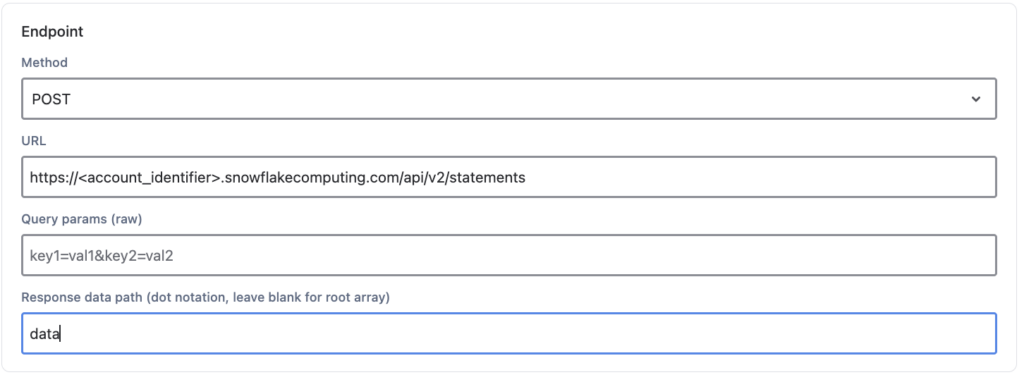
Once authentication is in place, OnLink submits the query as an HTTP POST to Snowflake’s SQL API statements endpoint.
Reference: Submitting a request to execute SQL statements
POST https://<account_identifier>.snowflakecomputing.com/api/v2/statements
Replace <account_identifier> with your Snowflake account identifier — for example, myorg-myaccount.
Snowflake expects a JSON body describing the statement and its execution context:
{
  "statement": "select * from T where c1=?",
  "timeout": 10,
  "database": "TESTDB",
  "schema": "TESTSCHEMA",
  "warehouse": "TESTWH",
  "role": "TESTROLE",
  "bindings": {
    "1": {
      "type": "FIXED",
      "value": "123"
    }
  }
}
Walking through each field:
| Field | What it does |
|---|---|
statement | The SQL to execute. The ? is a bind variable placeholder, resolved from bindings. |
timeout | Maximum seconds Snowflake will let the statement run. If omitted, the account’s STATEMENT_TIMEOUT_IN_SECONDS applies. |
database | Database context. Case-sensitive — must match what SHOW DATABASES returns (usually uppercase). |
schema | Schema context. Also case-sensitive. |
warehouse | The compute warehouse that runs the query. |
role | The role used to execute. Must be a role the OAuth token’s user can assume. |
bindings | Values substituted into the ? placeholders, keyed by position starting at "1". |
On bindings: each binding needs a type and a value, and the value is always a string — even for numbers. FIXED is the binding type for integers; TEXT for strings and for dates you want Snowflake to auto-parse; REAL for floats; BOOLEAN for true/false. Use bind variables rather than string-concatenating values into the statement — it’s cleaner and it avoids injection problems when the value comes from an Asset field or a user parameter.
On case sensitivity: this is the single most common cause of “object does not exist” errors. If you created your database as CREATE DATABASE TestDB without quotes, Snowflake stored it as TESTDB. Put TESTDB in the config, not TestDB.
OnLink takes the request body as a single-line configuration value. Multi-line JSON won’t parse. So the body above becomes:
config:http_body={"statement":"select * from T where c1=?","timeout":10,"database":"TESTDB","schema":"TESTSCHEMA","warehouse":"TESTWH","role":"TESTROLE","bindings":{"1":{"type":"FIXED","value":"123"}}}
To flatten your own JSON, paste it into a converter such as jsonformatter.org/json-to-one-line and copy the single-line output into the config:http_body value.
Tip: Compose and validate your JSON in expanded form first, confirm the query works with a
curlcall against Snowflake, and only then flatten it. Debugging a broken single-line string is unpleasant.
Before trusting it to a scheduled import, run the same request by hand:
curl -i -X POST \
    -H "Content-Type: application/json" \
    -H "Authorization: Bearer <oauth_token>" \
    -H "X-Snowflake-Authorization-Token-Type: OAUTH" \
    -H "Accept: application/json" \
    -H "User-Agent: OnLink/1.0" \
    -d "@request-body.json" \
    "https://<account_identifier>.snowflakecomputing.com/api/v2/statements"
Snowflake returns results in a structured JSON envelope: resultSetMetaData describes the columns, and data holds the rows as arrays of string values in column order.
SELECT CUSTOMERID, CUSTOMERNAME, SITEADDRESS, METERSERIAL, INSTALLDATE, STATUS
FROM TESTDB.TESTSCHEMA.CUSTOMER_ASSETS
WHERE REGION = ?
{
  "resultSetMetaData": {
    "numRows": 2,
    "format": "jsonv2",
    "rowType": [
      { "name": "CUSTOMERID",   "type": "fixed" },
      { "name": "CUSTOMERNAME", "type": "text" },
      { "name": "SITEADDRESS",  "type": "text" },
      { "name": "METERSERIAL",  "type": "text" },
      { "name": "INSTALLDATE",  "type": "date" },
      { "name": "STATUS",       "type": "text" }
    ]
  },
  "data": [
    ["10241", "Northgate Utilities", "412 Marlin Ave, Tampa FL", "MTR-88213", "2021-06-14", "ACTIVE"],
    ["10242", "Bayside Holdings",    "77 Pier Rd, Clearwater FL", "MTR-88907", "2022-11-02", "ACTIVE"]
  ],
  "code": "090001",
  "statementHandle": "01b2c3d4-0000-1a2b-0000-abcd0000e1f2"
}
OnLink maps each Snowflake column to an Asset field using key: syntax — the Snowflake column name on the left, the Asset field on the right:
key:customerid=Customer ID
map:customername=Customer Name
map:siteaddress=Site Address
map:meterserial=Serial Number
map:installdate=Installation Date
map:status=Asset Status
Read left to right: take the value in the customerid column and write it to the Asset field named Customer ID.
Applied to the first row of the result set:
| Snowflake column | Value | OnLink mapping | Asset field |
|---|---|---|---|
CUSTOMERID | 10241 | key:customerid=Customer ID | Customer ID |
CUSTOMERNAME | Northgate Utilities | key:customername=Customer Name | Customer Name |
SITEADDRESS | 412 Marlin Ave, Tampa FL | key:siteaddress=Site Address | Site Address |
METERSERIAL | MTR-88213 | key:meterserial=Serial Number | Serial Number |
INSTALLDATE | 2021-06-14 | key:installdate=Installation Date | Installation Date |
STATUS | ACTIVE | key:status=Asset Status | Asset Status |
The full configuration for the example above:
Endpoint
https://<account_identifier>.snowflakecomputing.com/api/v2/statements
OAUTH Connection
config:http_header={"Authorization":"Bearer <oauth_token>","X-Snowflake-Authorization-Token-Type":"OAUTH","Content-Type":"application/json","Accept":"application/json"}
Body
config:http_body={"statement":"SELECT CUSTOMERID, CUSTOMERNAME, SITEADDRESS, METERSERIAL, INSTALLDATE, STATUS FROM CUSTOMER_ASSETS WHERE REGION = ?","timeout":10,"database":"TESTDB","schema":"TESTSCHEMA","warehouse":"TESTWH","role":"TESTROLE","bindings":{"1":{"type":"TEXT","value":"SOUTHEAST"}}}
Field mapping
key:customerid=Customer ID
map:customername=Customer Name
map:siteaddress=Site Address
map:meterserial=Serial Number
map:installdate=Installation Date
map:status=Asset Status
| Symptom | Likely cause |
|---|---|
390318 / invalid token | OAuth token expired, or the wrong token type header |
| Object does not exist | Database, schema, or table name case doesn’t match Snowflake’s stored casing |
| Insufficient privileges | The role in the body lacks USAGE or SELECT on the target objects |
100037 bind value not recognized | Binding type doesn’t match the column, or the value isn’t a string |
| Empty or malformed config | JSON wasn’t flattened to a single line, or a quote was dropped during flattening |
| HTTP 429 | Too many concurrent requests — add retry logic with backoff |
Response has no data | Query ran asynchronously; poll GET /api/v2/statements/<statementHandle> |
If you have use cases that need data from Snowflake to Assets, give OnLink a try.