
Happy Monday, everyone. Another week, and we’re excited to ship a new feature for our customers.
If you follow our articles, you know we write a lot about integration support for Assets. Given the data volumes involved, the common design pattern for Assets is batch-based imports — pull a full inventory on a schedule, reconcile, repeat. That pattern suits the majority of integrations well. But for some use cases event based is suitable.
That’s where webhooks come in.
A few examples:
In this article, we’ll use BigPanda to Assets as a worked example to showcase the new webhook feature in OnLink.
BigPanda’s Notifications Webhook is the outbound half of this integration. It lets BigPanda POST incident data to an external system whenever an incident is shared or changes state.
Sample Event Payload
{
“incident”: {
“id”: “5555370aabc20a001145d6g9”,
“status”: “Critical”,
“active”: true,
“severity”: “Critical”,
“flapping”: false,
“resolved”: false,
“snooze”: {
“snoozed”: false,
“wake”: null,
“autoCancel”: false
},
“startedOn”: 1649576282,
“changedOn”: 1649576282,
“updatedOn”: 1652897578,
“endedOn”: null,
“alerts”: [
{
“id”: “5555370aabc20a001145c5e9”,
“status”: “Critical”,
“startedOn”: 1649576282,
“endedOn”: null,
“changedOn”: 1649576282,
“updatedOn”: 1649576282,
“active”: true,
“primaryProperty”: “host”,
“secondaryProperty”: “check”,
“sourceSystem”: “nagios.est”,
“description”: “CPU is 98%”,
“tags”: [
{
“name”: “check”,
“value”: “CPU”
},
{
“name”: “_cluster”,
“value”: “modiin-prod”
},
{
“name”: “run-book”,
“value”: “https://mywiki.com/Evyatar-11/modiin-prod”
},
{
“name”: “host”,
“value”: “Evyatar-11”
}
]
},
{
“id”: “555537133ec0020012c96a28”,
“status”: “Critical”,
“startedOn”: 1649576282,
“endedOn”: null,
“changedOn”: 1649576282,
“updatedOn”: 1649576282,
“active”: true,
“primaryProperty”: “host”,
“secondaryProperty”: “check”,
“sourceSystem”: “nagios.est”,
“description”: “CPU is 98%”,
“tags”: [
{
“name”: “check”,
“value”: “CPU”
},
{
“name”: “host”,
“value”: “web3”
},
{
“name”: “_cluster”,
“value”: “modiin-prod”
},
{
“name”: “run-book”,
“value”: “https://mywiki.com/web3/modiin-prod”
}
]
}
]
},
“links”: {
“landingPage”: “http://bigp.io/9ad55554d5c116e4”
},
“incidentTags”: [
{
“id”: “itd_priority_1”,
“value”: 1000
}
],
“relatedChanges”: [
{
“suggested_by_bigpanda”: true,
}
On the OnLink side, the goal is to stand up an endpoint that BigPanda can call, authenticate the caller, and land the payload in the right object type. The full walkthrough lives in our BigPanda to JSM Assets documentation, but here’s the shape of it.
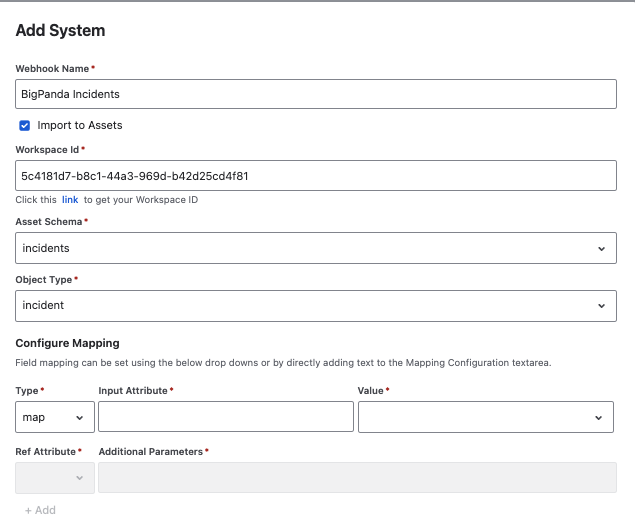
Create the webhook. Open the OnLink application, go to Webhooks, and click Add.
Configure the Assets destination. Give the webhook a name, then select Import to Assets. Enter your Workspace ID, choose the target Asset Schema, and select the Object Type the incoming records should land in — for this example, an Incident object type in your CMDB schema.
Set basic authentication. BigPanda authenticates with basic auth, so set an auth scheme, username, and password on the webhook before you publish it. These go in the same Attributes box as the field mapping, using config: lines — we’ll look at the exact syntax in the next section. These are the credentials BigPanda will present on every call, and OnLink will reject anything that doesn’t match.
Publish and copy the URL. Publishing generates the OnLink webhook URL. That URL is what goes into BigPanda’s callback configuration, along with the same username and password.
Verify. Send a test payload from BigPanda and confirm the object shows up in your Assets object type. This is the step worth being patient with — a test payload from the real source is far more informative than a hand-crafted one, because it exercises the actual field names and nesting you’ll be mapping against.
Note that there’s no polling schedule to configure here, and no import window to tune. The endpoint is live, and records arrive when events happen.
Mapping is where the BigPanda payload becomes an Assets object. In the webhook’s Attributes box, you declare the mapping one line at a time, using the form prefix:<source field>=<target>. Here’s the complete configuration for our BigPanda example:
key:incident.id=Incident ID
map:incident.status=status
map:incident.resolved=resolved
map:incident.alerts.0.id=alert_id
map:incident.alerts.0.status=alert_status
map:incident.alerts.0.description=alert_description
config:auth_scheme=basic_auth
config:auth_username=onlink_bigpanda
config:auth_password=enc__••••••••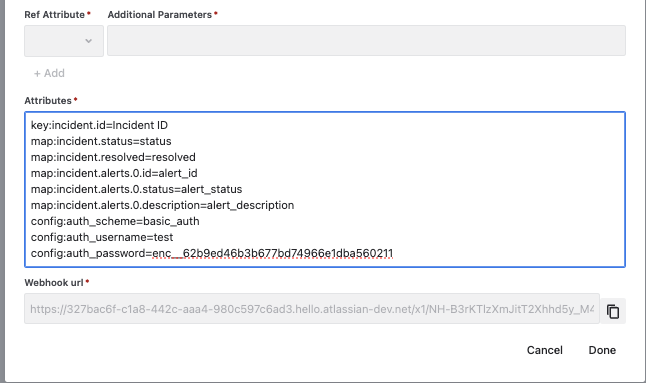
If you have use cases where you want to capture webhook events into Assets — incidents, invoices, purchase orders, deployments, or anything else that arrives as it happens, give OnLink a try.