
Short answer: OnLink connects Paychex to Atlassian Service Collection in two ways. Syncing Worker data into Assets, and real-time webhooks so HR events like new hires or terminations automatically create tickets.
If your company runs HR on Paychex and IT service delivery on JSM then this one is for you.
| Manual Notification | With OnLink |
|---|---|
| New hire in Paychex is notified manually through email to IT | Worker record synced into JSM Assets automatically |
| IT provisioning starts when someone request using a form, email or slack message | Ticket created the moment the new hire event fires |
| Asset ownership is manually updated | Assets linked to the employee record they belong to |
| Offboarding is a manual checklist |
Termination event triggers the offboarding ticket |
Step by step instructions to connect to Paychex using API:
api.paychex.com/auth/oauth/v2/token and enter your Client ID and Secret.GET, URL api.paychex.com/companies/{companyId}/worker, response data path context.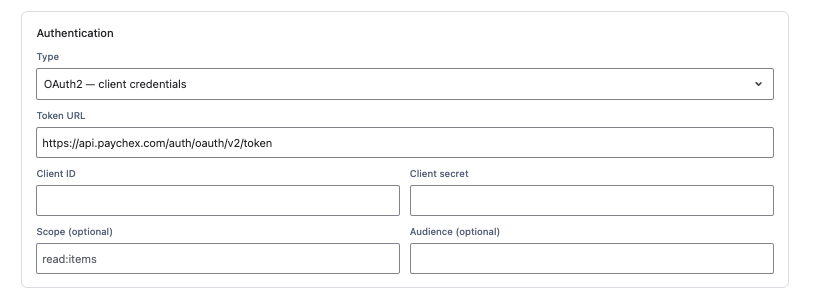
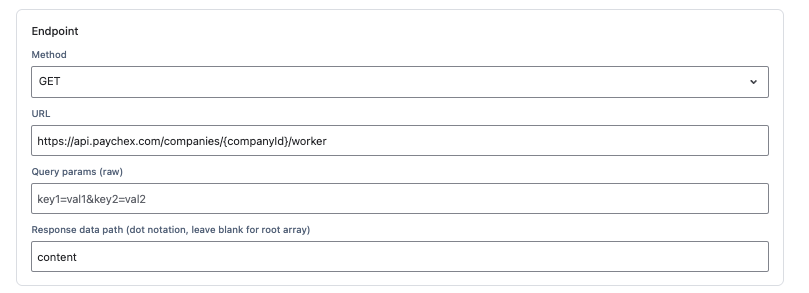
| Paychex field mapping | Assets attribute |
|---|---|
key:workerId | Worker ID (unique key, used to match and update existing objects) |
map:employeeId | Employee Number |
map:employmentType | Type |
map:job.title | Job Title |
map:name.preferredName | Name |
map:supervisor.workerId | Manager |
map:currentStatus.statusType | Status |
OnLink supports filters, e.g to filter active workers only, add a query parameter such as status=ACTIVE to the request before running the import.

Step by step instructions to configure webhook in OnLink:
config:auth_scheme=header_token and a random 12-character config:auth_token.APIKEY, and choose the event domain — e.g. WRKR_ADD for new hires.key: and map: statements to populate the ticket or asset object (see table below).Field mapping (new-hire ticket example)
| Webhook field | Jira field |
|---|---|
key:workerId | Worker ID (unique key) |
map:employeeId | Employee Number |
map:name.preferredName | Employee Name |
map:currentStatus.statusType | Status |
Does Paychex integrate with Atlassian Service Collection?
Yes. OnLink connects to the Paychex Flex API and syncs Workers data into Jira Service Management Assets, and can trigger real-time actions in Atlassian Service Collection from Paychex HR events like new hires, terminations, and role changes.
What’s the difference between the Assets sync and the webhook integration?
The Assets sync keeps a full, ongoing record of employee data inside your Assets schema. The webhook integration reacts to individual Paychex events in real time, creating or updating tickets and asset objects as they happen, without waiting for the next sync.
Can Paychex events automatically create Jira tickets for IT?
Yes. OnLink’s webhook integration can map any subscribed Paychex event, such as a new hire, to an automated action in Atlassian Service Collection, including creating a provisioning ticket or updating an asset object, without manual entry.
How long does it take to set up the Paychex and OnLink integration?
Most teams complete the initial Assets field mapping and webhook configuration in under an hour, following OnLink’s guided setup for the Paychex API connection and event subscriptions.