AWS to Jira Service Management Assets: Sync Accounts and EC2 Instances with OnLink
When a request says “it’s one of the frontend boxes in prod”, someone has to work out which AWS account, which Region and which instance before any real work starts. OnLink brings AWS to Assets: it imports AWS accounts and EC2 instances into Jira Service Management Assets, so the requester picks the exact instance and the agent sees its account, Region and tags on the ticket.
In shortOnLink reads AWS resources through two calls: AWS Organizations ListAccounts for accounts, and AWS Resource Explorer ListResources for EC2 instances, Dedicated Hosts and IAM roles across every account and Region. Each becomes its own Assets object type, linked by account.
Why put AWS resources in Assets
AWS inventory usually lives in the console, split across accounts and Regions, while requests live in Jira Service Management. Bringing AWS into Assets puts the resource and its context on the ticket, where requesters and agents already work.
Requesters pick, not describe
An Assets field on the request form lists your real EC2 instances by their Name tag. Nobody has to describe "the frontend box" again.
Account and Region on the ticket
Account, Region, environment and team tags show on the request, so the first reply isn't "which one?".
Route by AWS account
JSM automation reads the instance's account and assigns the request to the team that owns it.
One CMDB across clouds
AWS sits next to Google Cloud, Azure, devices and people from OnLink's other 100+ sources, in the same Assets schema.
What it looks like in Jira Service Management
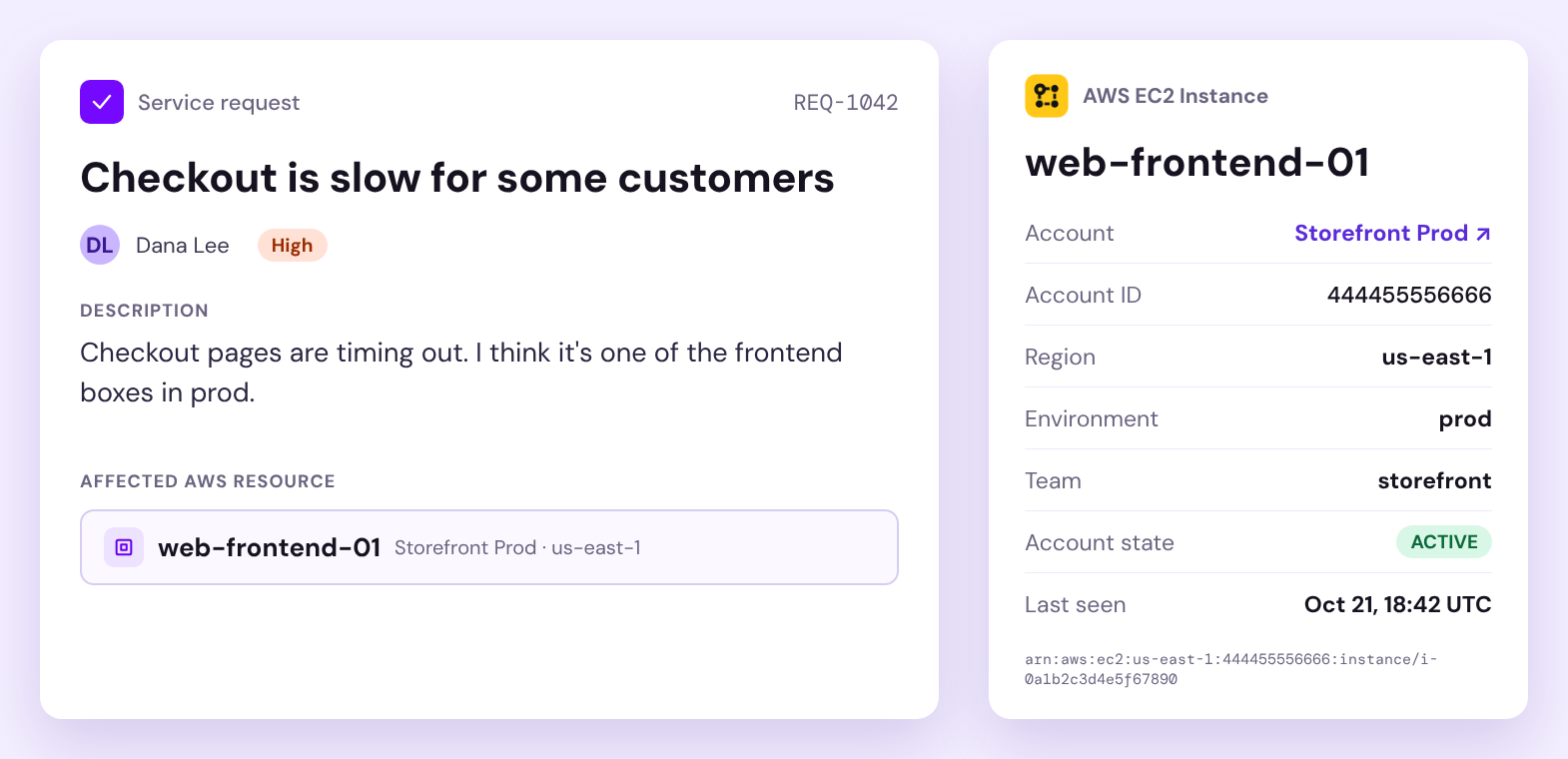
The requester types part of an instance name into an Assets field and picks web-frontend-01. The agent opens the request and sees the AWS account, account ID, Region, environment and team tags, the account state and when AWS last saw the instance, all synced by OnLink.
Example data. Field names and attributes depend on your Assets schema and mapping.
See it in 30 seconds
How AWS maps to Assets
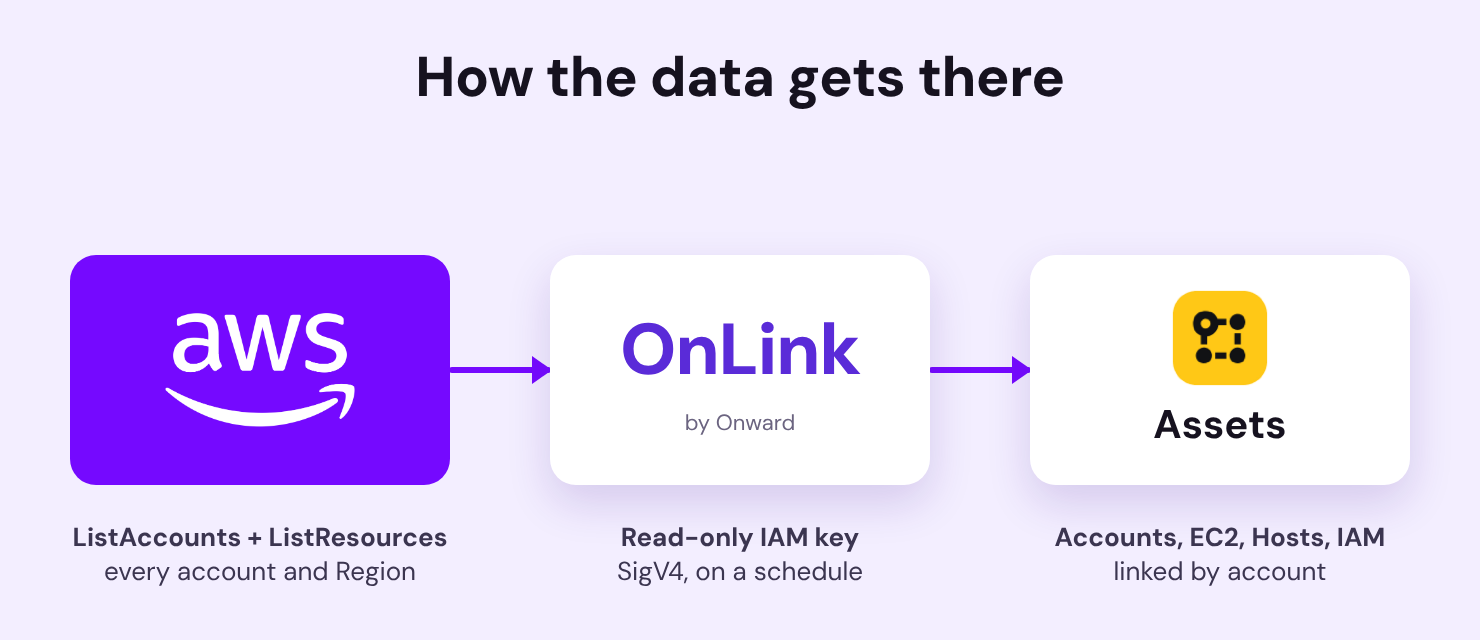
Two API calls become two Assets object types. AWS Organizations returns every member account; Resource Explorer returns every EC2 instance in the organization with its ARN, owning account, Region and tags. Each instance references its AWS Account object, so automation and reports can work by account. Dedicated Hosts and IAM roles use the same Resource Explorer call with a different filter.
AWS accounts and EC2 instances flow through OnLink into linked Assets objects.
How it works
Setup comes down to three parts. The setup guide has the IAM policy, sample responses, mappings and troubleshooting.
1
Create a read-only IAM user
Turn on Resource Explorer for the organization and create an organization-wide view that includes tags. Then create an IAM user with a read-only policy (Resource Explorer search and Organizations list calls) and give OnLink its access key. OnLink signs each call with AWS Signature V4.
2
Pull accounts and instances
OnLink calls ListAccounts for accounts and ListResources for EC2 instances. One request covers every account and Region in the organization, and pages with NextToken. Filters such as region:us-east-1 or tag:env=prod keep the import to what your service desk supports.
3
Map fields and schedule the sync
Key accounts on the account ID and instances on the ARN, map the Name tag to the label, and link each instance to its account. Then schedule the import hourly, daily or weekly.
Sample mapping for EC2 instances:
					key:Arn=ARN
map:jsonpath__Properties.0.Data.*.Value__where__Properties.0.Data.*.Key_eq_Name=Name
map:OwningAccountId=Account|Account ID=${OwningAccountId}|create=false
map:Region=Region
map:jsonpath__Properties.0.Data.*.Value__where__Properties.0.Data.*.Key_eq_env=Environment
map:LastReportedAt=Last Seen
OnLink is one app with 100+ connectors. AWS sits next to Google Cloud and Azure for cloud resources, Intune, Jamf and NinjaOne for devices, CrowdStrike and Defender for Endpoint for security, and Workday, BambooHR or Entra ID for people. One app to manage, one place to map, every source in the same Assets schema.
Bring your AWS accounts and instances into Assets
Start a free trial of OnLink on the Atlassian Marketplace and connect AWS with a read-only IAM key.
Can I import AWS resources into Jira Service Management Assets?
Yes. OnLink imports AWS accounts from AWS Organizations, and EC2 instances, Dedicated Hosts and IAM resources from AWS Resource Explorer, into Jira Service Management Assets object types.
Do I need a separate import for each AWS account and Region?
No. An organization-wide Resource Explorer view returns resources from every account and Region where Resource Explorer is turned on, in one paged call.
What access does OnLink need in AWS?
A read-only IAM user with Resource Explorer search and Organizations list permissions. OnLink can’t change anything in your AWS environment.
Does it include instance type, state and IP address?
Resource Explorer returns the ARN, account, Region and tags. If you run AWS Config with an organization aggregator, a second import can add instance type, state and IP address.
How often does OnLink sync AWS?
You set a schedule per import: hourly, daily, weekly or monthly. Many teams sync accounts daily and EC2 instances a few times a day.
On this page
AWS in Assets
Start a free trial of OnLink on the Atlassian Marketplace and bring AWS accounts and EC2 instances into Assets.
Your service desk shouldn’t have to guess which AWS instance a request is about. Bring accounts and EC2 instances into Assets and put the context on every ticket.