OnLink · Identity data

Bringing Entra ID Data into Assets: Use Cases, Automations, and Rovo Agents

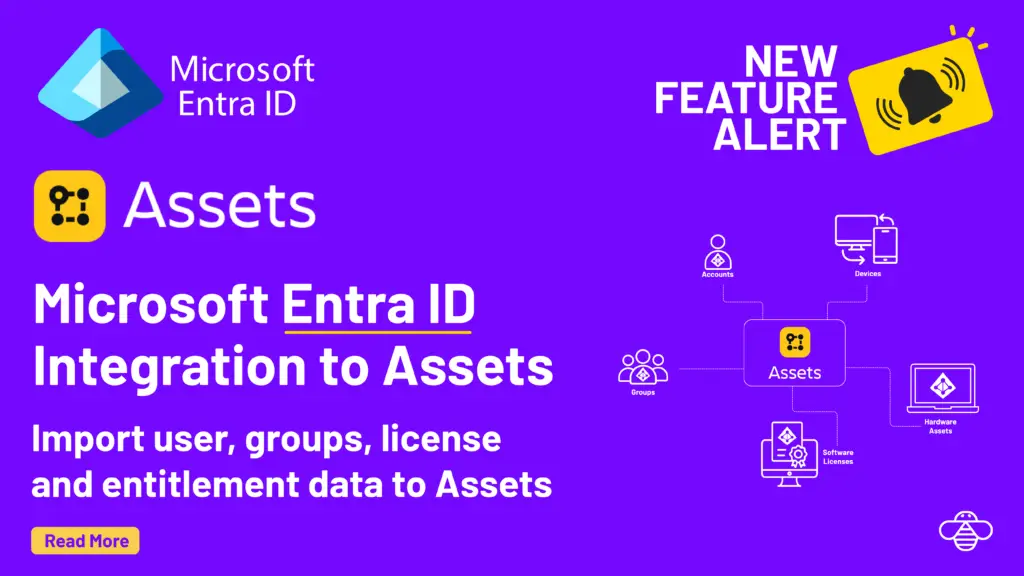
Microsoft Entra ID (formerly Azure AD) holds the authoritative record of your users, groups, licenses and apps. OnLink brings Entra ID data into Jira Service Management Assets through the Microsoft Graph API.

This guide covers what the API exposes, what you can do once that data is in Assets (ticket context, automation rules and Rovo Agents), and the OnLink mapping syntax that makes it work.

Overview of the Entra ID (Microsoft Graph) API

Entra ID exposes its data through the Microsoft Graph API, REST endpoint (https://graph.microsoft.com/v1.0/) that provides access to users, groups, licenses, applications, organizational units, and sign-in activity across your Microsoft 365 tenant.

Key resources available via the Graph API include:

Users

Every attribute you'd expect: displayName, userPrincipalName, department, jobTitle, companyName, employeeType, employeeHireDate, mobilePhone, officeLocation, usageLocation, country, and more. The full property list is documented at Microsoft's Graph API reference.

Groups

Security groups, Microsoft 365 groups, and distribution lists — each with displayName, description, and id. Groups are how organizations define team membership, access policies, and role boundaries.

Licenses

Assigned SKUs (e.g., Microsoft 365 E3, Defender for Endpoint) tied to each user, surfaced via the assignedLicenses property and license detail endpoints.

Applications

App registrations and enterprise apps that users and groups have access to.

Sign-in Activity

Last sign-in timestamps (lastSignInDateTime, lastSuccessfulSignInDateTime, lastNonInteractiveSignInDateTime) through the signInActivity resource, gated behind the AuditLog.Read.All permission.

Manager Hierarchy

The manager relationship on each user, enabling org-chart traversal and people-chain lookups.

The API supports OData $filter, $select, $expand, and pagination via @odata.nextLink, making it flexible enough to fetch exactly the subset of data you need.

What you can solve by having Entra ID data in Assets

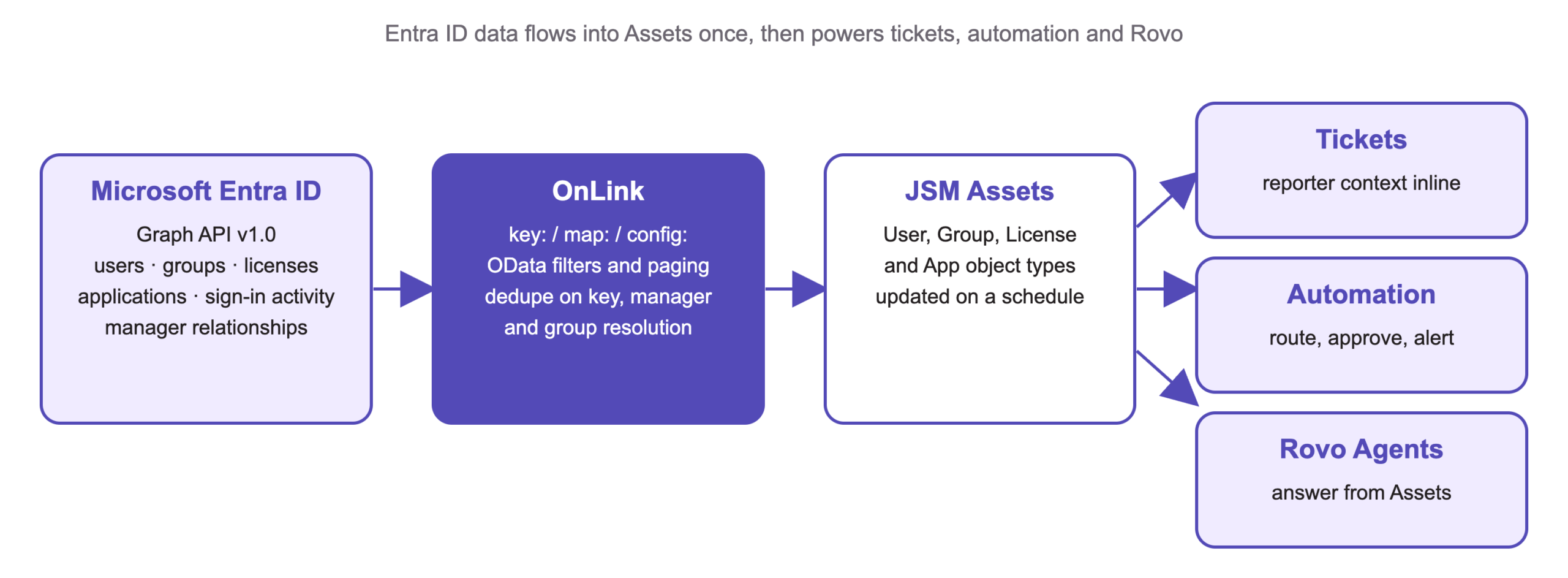
Flow diagram: Microsoft Entra ID Graph API data imported by OnLink into JSM Assets, then used in tickets, automation and Rovo Agents.
How Entra ID data reaches Assets with OnLink, and where it gets used.

Reference Assets Directly in Tickets

When a user submits a ticket, agents need context: What department are they in? Who’s their manager? What licenses do they hold? What groups are they a member of?

With Entra ID synced to Assets, agents can attach the reporter’s User asset object to the ticket and immediately see all of this — no toggling to Azure Portal, no asking the user for their department, no chasing down the manager name. Custom fields in JSM can reference Asset objects, so the employee record surfaces inline in the ticket view.

This is particularly powerful for:

  • Access request tickets — see what licenses and groups the user already has before provisioning more
  • Offboarding tickets — instantly view all groups, apps, and licenses to revoke
  • IT support escalations — know the user’s role, location, and manager before the first response

Use in Automation

JSM’s automation engine can read and act on Asset attributes. With Entra ID data in Assets, you can build rules like:

Automation
How it uses the Entra ID asset
Auto-assign by department — when a ticket comes in and the reporter's Department asset attribute is "Engineering," route it to the Engineering IT queue
License-based approvals — trigger an approval flow when a user requests a license they don't yet hold, referencing their current license asset records
Manager notification — when an employee's access request is submitted, look up the ManagerObject asset attribute and auto-email or Slack the manager for approval
Inactive account alerts — using Sign-in Activity sync, fire an automation when lastSuccessfulSignInDateTime exceeds 90 days, creating a deprovisioning review ticket
Group membership checks — auto-close or auto-route tickets based on whether the user is a member of a specific Entra ID group (e.g., VPN-Users, Finance-Team)

Use in Rovo Agents

Rovo Agents can query Assets as a knowledge source, which means a Rovo Agent equipped with your Entra ID-backed Asset schema can answer questions and take actions that previously required a human lookup:

  • “Who is Sarah’s manager and what groups is she in?” — answered from the ManagerObject and Azure Groups attributes in Assets
  • “Which users in the Finance department have a Microsoft 365 E5 license?” — cross-referenced from License and User asset objects
  • “Who hasn’t logged in to their account in the last 60 days?” — queried from the Sign-in Activity attributes in Assets
  • “Draft an offboarding checklist for John based on his group and license assignments” — Rovo Agent reads his asset record and generates a tailored checklist

Here is an excellent article on how to use Rovo for searching assets.

Support is always prompt and helpful. The product is easy to work with, and support is always around for any gaps or questions I may have.
Morghan Castorena
OnLink customer · Atlassian Marketplace review, Sep 2026

How OnLink imports Entra ID into Assets

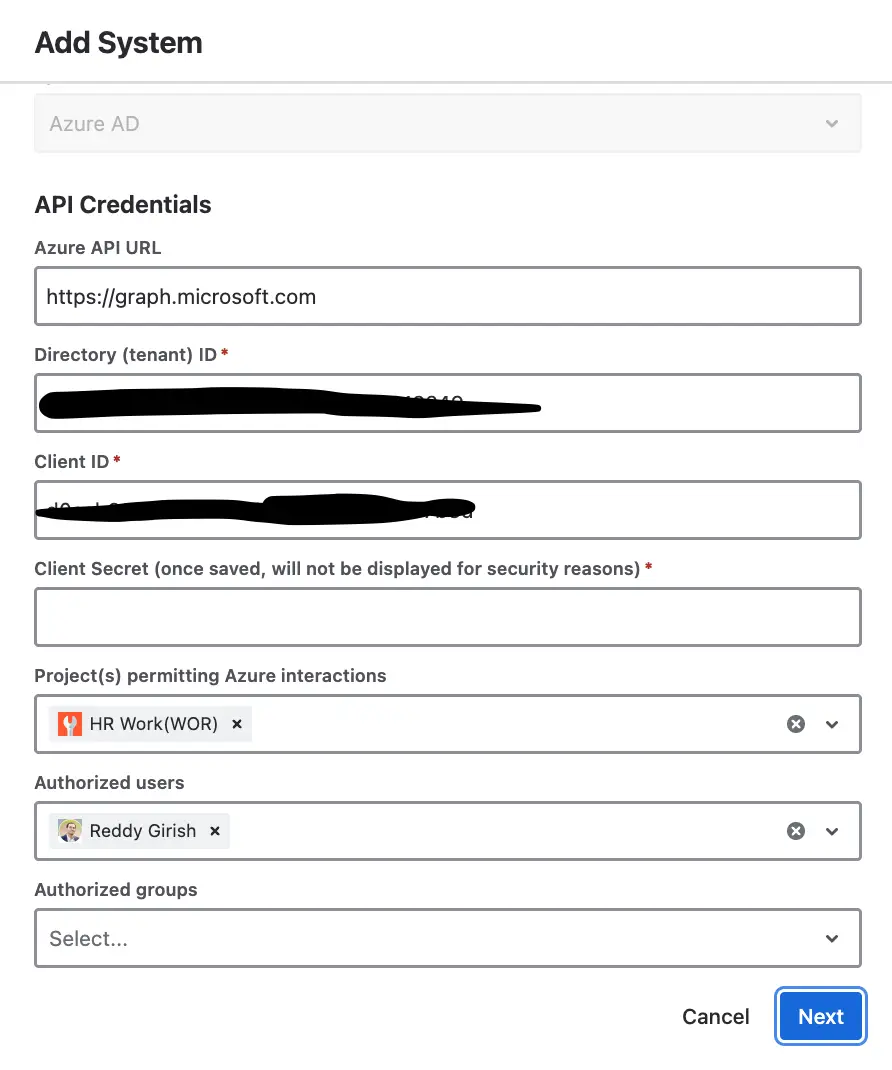
OnLink API credentials for connecting to Microsoft Entra ID
OnLink: API credentials for connecting to Microsoft Entra ID.

The configuration is done through a simple attribute mapping syntax. You define which Entra ID fields map to which Asset attributes, set the sync frequency, and OnLink handles pagination, deduplication, and relationship resolution.

Full technical documentation is here: Entra ID (Azure AD) to JSM Assets — OnLink Docs

Here’s a breakdown of what OnLink supports:

Entra ID user field mapping to Assets

Any scalar field from the Graph API user object can be mapped to an Asset attribute using the map: prefix. The key: prefix designates the unique identifier used to match and update records on subsequent syncs.

				
					key:userPrincipalName=WorkerID
map:userPrincipalName=Atlassian Account ID
map:displayName=DisplayName
map:department=Department
map:jobTitle=JobTitle
map:companyName=CompanyName
map:usageLocation=Usage Location
map:businessPhones.0=Business Phone
map:employeeHireDate=Hire Date
map:country=Country


When userPrincipalName is mapped to the Atlassian Account ID attribute (which is of type “User”), OnLink automatically resolves the Atlassian user object — linking the Asset record to the actual Jira user account.

Array fields use dot notation: businessPhones.0 fetches the first element of the phones array.

Manager mapping

OnLink provides a special EmployeeManager property that resolves the manager relationship through the Graph API. A self-referencing object attribute in the user schema stores the manager link:

				
					map:EmployeeManager=ManagerObject|WorkerID=${EmployeeManager}|create=true
config:expand=manager


Because the Entra ID API doesn’t support filters when expanding managers, OnLink recommends a dedicated import job for manager resolution, set with a high data_limit to ensure full coverage. The result: every user asset contains a clickable ManagerObject reference that links to the manager’s own asset record.

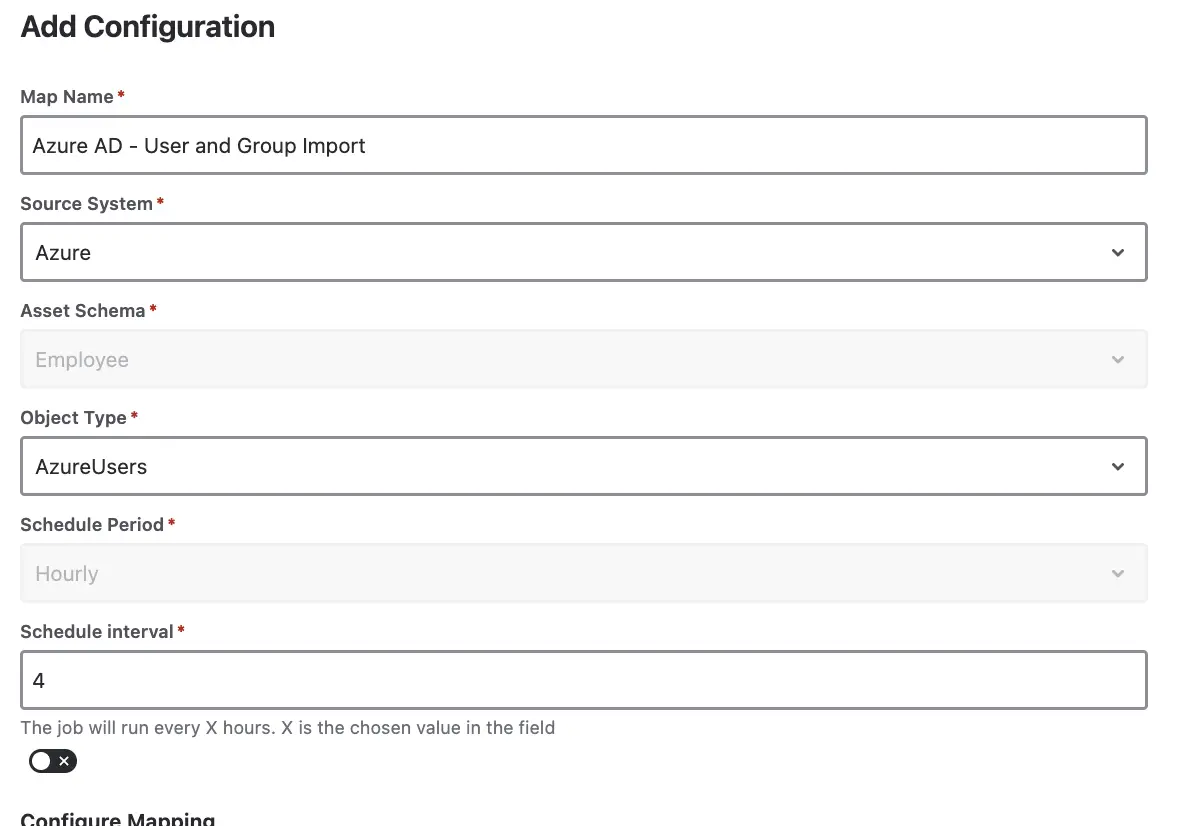
OnLink import configuration for Entra ID users, groups and managers
OnLink: import configuration for Entra ID users, groups and licenses.

Groups, licenses, apps, sign-in activity and config:api

Setting config:export_azure_groups=true tells OnLink to pull all groups assigned to each user and populate a dedicated Azure Groups Asset schema (with attributes: Group Display Name, Group Description, Group ID). The user schema then carries a reference attribute pointing to that schema — so each user asset links to their full set of group memberships.

This enables group-based routing, access visibility, and audit reporting directly from JSM.

Setting config:export_azure_licenses=true enables license sync into an Azure Licenses schema (License ID, License SKU Part Number, License SKU ID). Each user’s assigned licenses are then linked to their record, giving you a real-time view of software entitlements across your workforce — directly from the service desk.

Using config:api, OnLink can be pointed at any Entra ID Graph API endpoint — not just users. To pull all groups into Assets:

				
					config:api=groups


Or to pull service principals, applications, or any other Graph resource. This makes OnLink’s Entra ID connector extensible to any data the Graph API exposes.

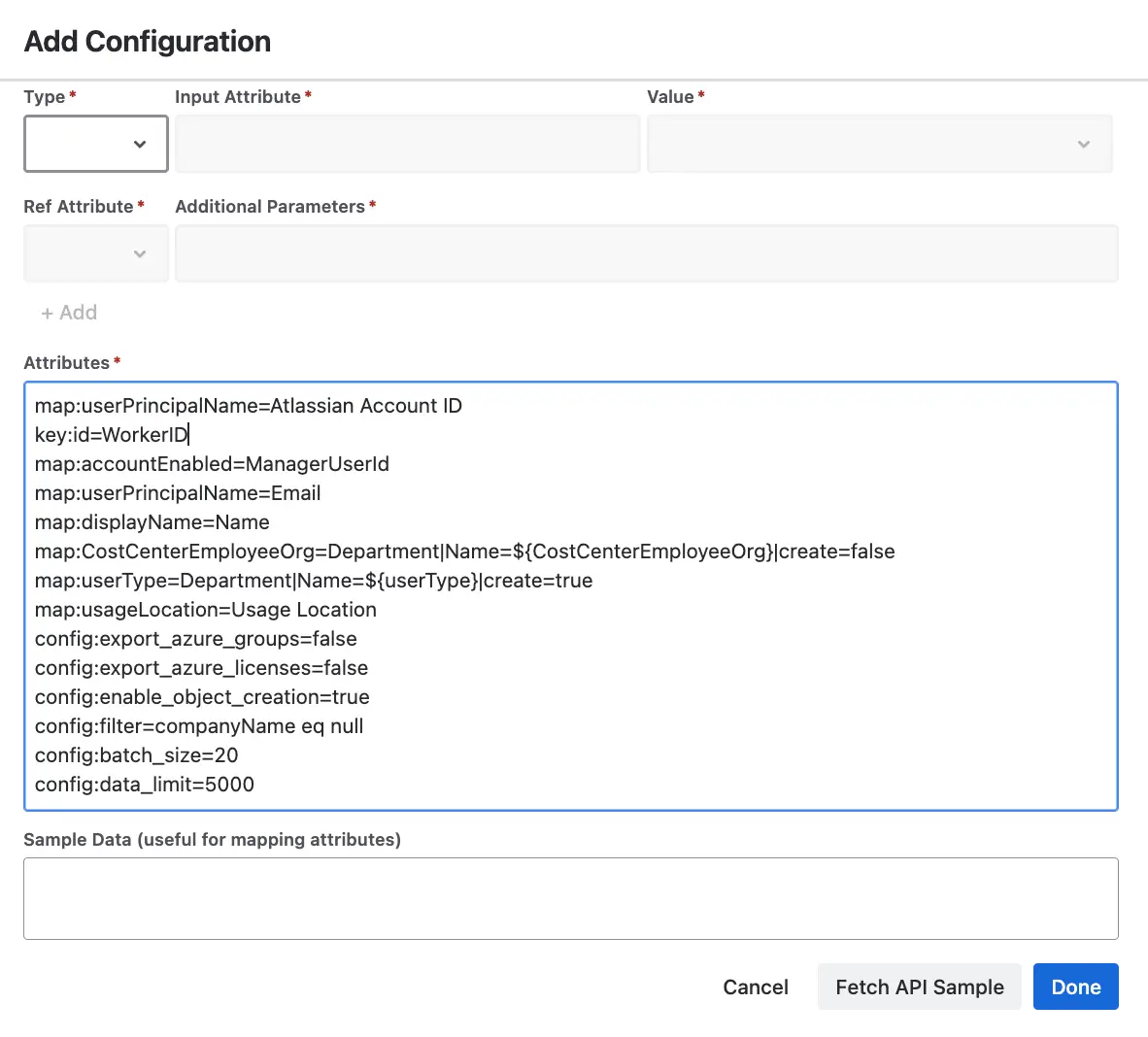
OnLink attribute mapping for Entra ID apps in JSM Assets
OnLink: attribute mapping for Entra ID apps in JSM Assets.

For dormant account detection and access governance, OnLink can sync sign-in timestamps:

				
					map:signInActivity.lastSuccessfulSignInDateTime=Last Logon
map:signInActivity.lastSignInDateTime=Last Sign In
map:signInActivity.lastNonInteractiveSignInDateTime=Last Non-Interactive Sign In


This requires the AuditLog.Read.All permission to be granted to the OnLink app registration in Entra ID. Once synced, these attributes can drive automations that flag or deprovision inactive accounts.

One of OnLink’s most flexible features is the config:api parameter, which lets you override the default users API call with any valid Microsoft Graph endpoint:

				
					config:api=groups          # Pull all groups
config:api=applications    # Pull all app registrations
config:api=servicePrincipals


Combined with config:filter for OData filtering (e.g., config:filter=country eq 'United States') and config:data_limit for scoped testing, this gives you precise control over exactly what gets imported and when.

Ready to bring Entra ID into Assets?

Try OnLink on the Atlassian Marketplace and have your Entra ID users, groups and licenses in JSM Assets today.

FAQ

User.Read.All and Group.Read.All cover users, groups and manager relationships. Add Directory.Read.All for licenses and applications, and AuditLog.Read.All for sign-in activity. All are application permissions granted to the OnLink app registration with admin consent; no user credentials are stored.

The key: line (normally userPrincipalName) identifies each user. On every scheduled run OnLink pages through the Graph API, matches existing Assets objects on the key and updates them in place, so there are no duplicates and attribute changes such as department or manager flow through automatically.

Yes. Use config:filter with an OData expression, for example accountEnabled eq true or department eq 'Engineering', so only the users you need land in Assets. The same works for groups and applications through config:api.

OnLink goes further than the native importer: manager and group relationships, licenses, sign-in activity, custom Graph endpoints, and the same app for Intune, Jamf, Okta, Workday and 70+ other sources. See how OnLink compares with native and third-party options, or the full list of sources.

Yes. Pair OnLink with OnRamp to turn joiner, mover and leaver events into JSM workflows, and push people data to Atlassian Teamwork Graph so Rovo can reason over the org chart.

On this page

Entra ID data in Assets

Start a free trial of OnLink on the Atlassian Marketplace. Entra ID is one of 100+ identity, device and HR sources in the same app.

Try OnLink for Entra ID to JSM Assets

Try OnLink on the Atlassian Marketplace today. OnLink supports 100+ sources in the same app.

With Entra ID data in Assets, your team can: