Jamf is the industry-leading Apple device management platform, purpose-built for managing, securing, and deploying macOS, iOS, iPadOS, tvOS, and visionOS devices at enterprise scale. Jamf API Documentation Link.
Similar tools in the Apple MDM landscape
Jamf Pro
Jamf is the industry-leading Apple device management platform, purpose-built for managing, securing, and deploying macOS, iOS, iPadOS, tvOS, and visionOS devices at enterprise scale.
Iru (formerly Kandji)
Iru (formerly Kandji) is a unified platform combining MDM, endpoint detection and response, and identity management in a single product. OnLink supports Iru integration to Assets.
Addigy
Addigy focuses on Apple device management for managed service providers (MSPs) and IT consultancies, offering multi-tenant management and a strong remote support experience. OnLink supports Addigy integration to Assets.
Use cases and automations when Apple device data lands in Assets
Once your Apple device inventory flows into Atlassian Assets, it stops being a static spreadsheet and becomes an active participant in your IT service delivery workflows. Here are the key use cases and automations this enables.
Referencing Assets Directly in Tickets
When an employee raises a service request — “my MacBook is running slow” or “I need a replacement charger” — the support agent can instantly pull up the relevant device asset directly within the Jira Service Management ticket.
Powering JSM Automation Rules
Jira Service Management’s automation engine becomes dramatically more powerful when it has access to real-time device data from Assets. Here are some practical automations you can build.
Intelligent ticket routing
Automated SLA assignment
Proactive compliance alerts
Lifecycle management workflows
Onboarding and offboarding automation
Leveraging Rovo Agent for AI-Powered Device Intelligence
Atlassian’s Rovo agents bring AI-powered intelligence directly into your JSM workflows, and they become significantly more useful when Assets is populated with rich device data. You can now have AI agents that help answer questions on replacements, warranties and other device related queries.
How OnLink integrates Jamf to Assets
Getting device data from Jamf into Assets shouldn’t require a custom integration, middleware or manual import. That’s exactly the problem OnLink solves.
Jamf connection
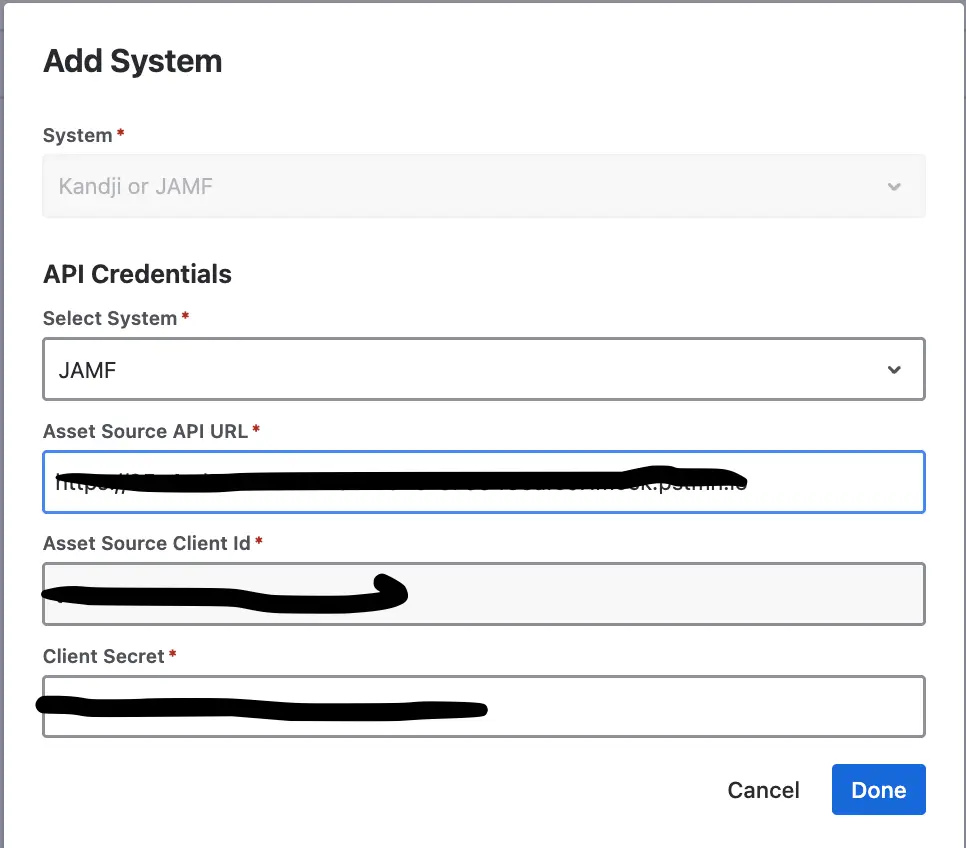
OnLink connects to your Jamf instance using API credentials (configured through API Roles and Clients in Jamf Pro).
OnLink: API credentials for connecting to Jamf Pro (API roles and clients).
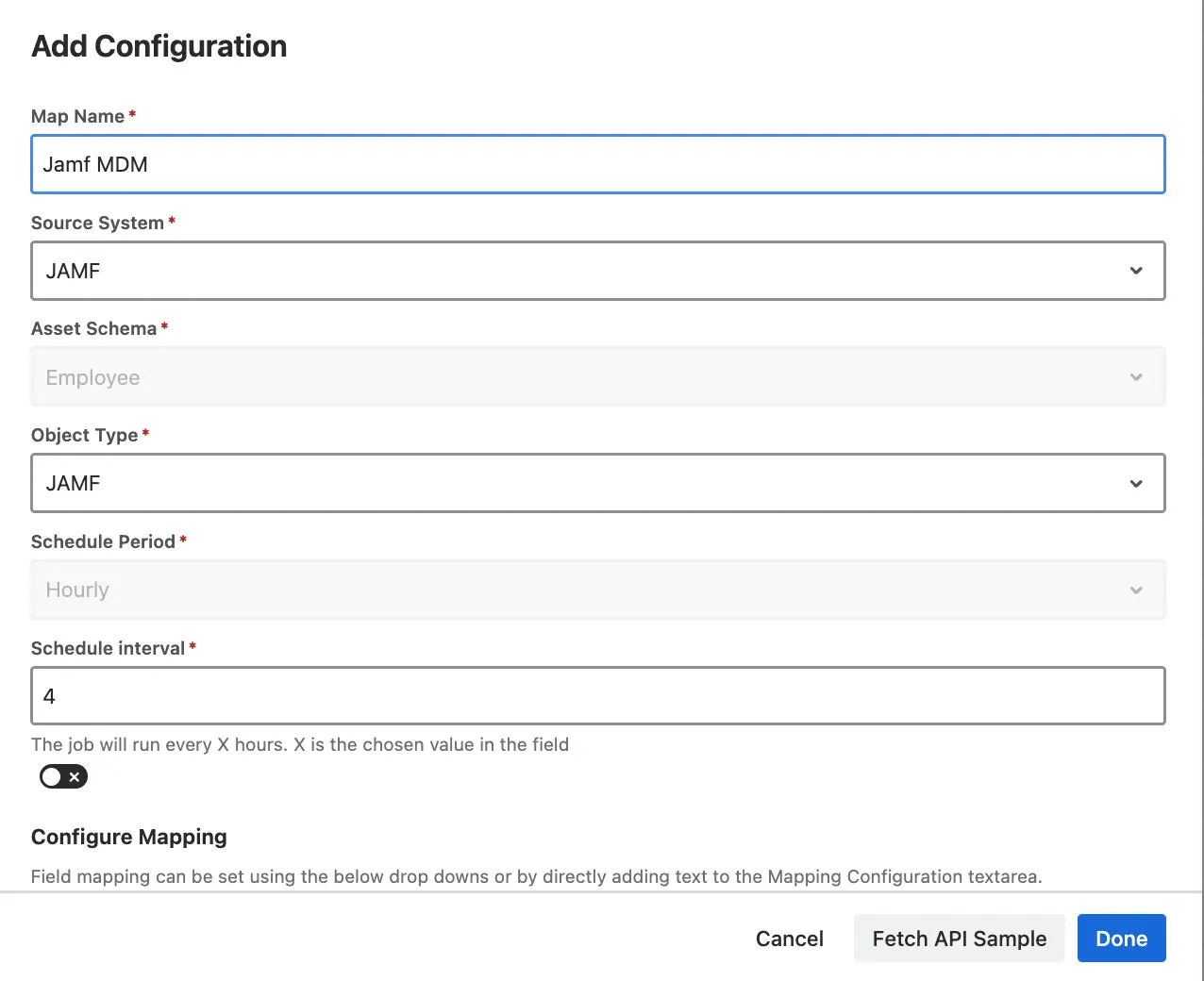
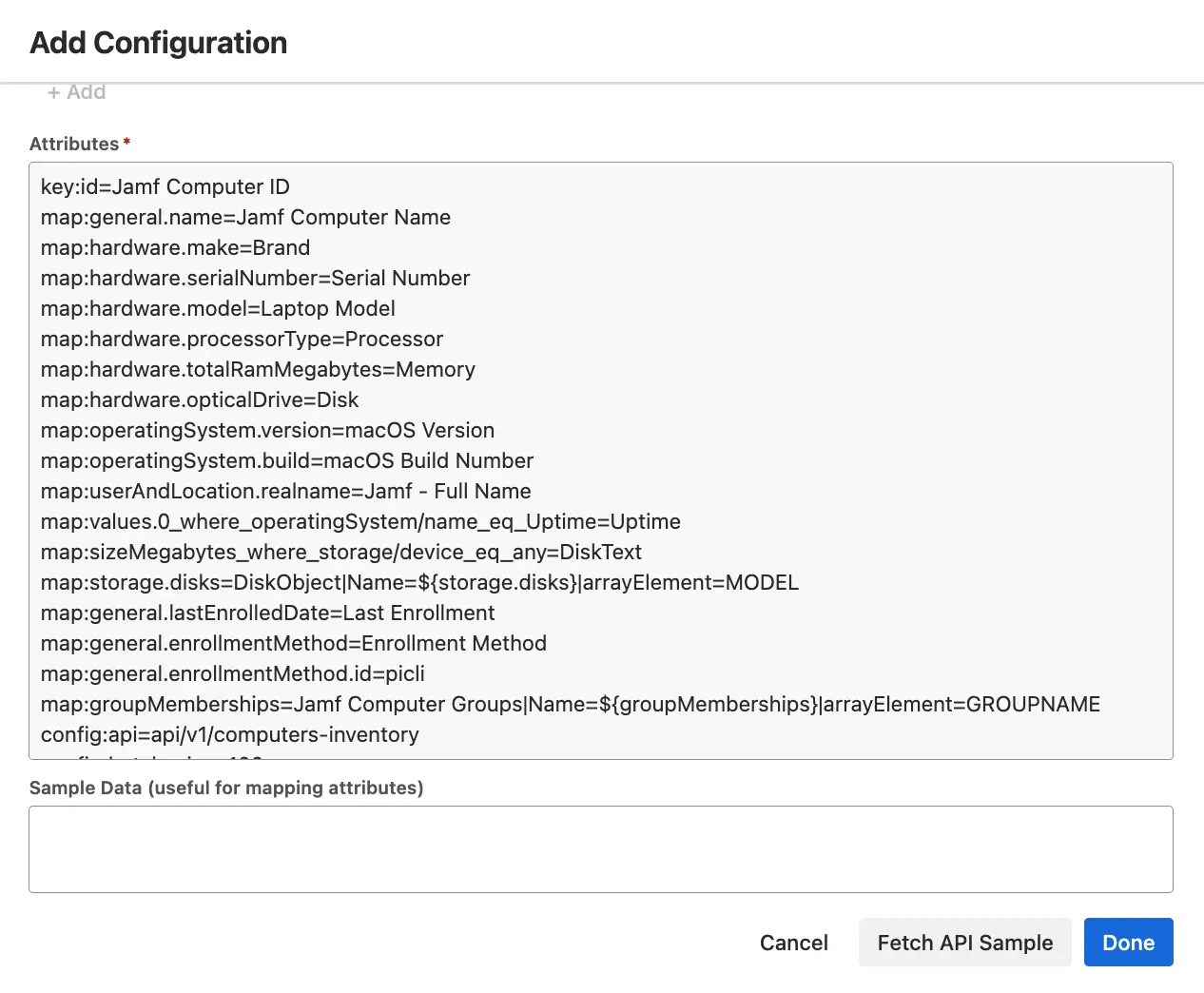
Once connected, you define a field-level mapping that tells OnLink exactly which Jamf attributes should flow into which Assets attributes.
Jamf field mapping to Assets
Here’s an example of how OnLink maps Jamf mobile device data to Assets attributes:
Jamf Field
Assets Attribute
Purpose
mobile_device.id
Device ID
Unique identifier (used as the key for updates)
mobile_device.serial_number
Serial Number
Hardware serial number
mobile_device.device_name
Device Name
User-facing device name
mobile_device.name
Name
Device name in Jamf
mobile_device.model
Model
Hardware model
For computer inventory using the Jamf Pro API, the mapping looks like this:
Jamf Field
Assets Attribute
Purpose
id
ID
Unique identifier
general.name
Name
Computer name
general.platform
Platform
Operating system platform
groupMemberships
Group Memberships
Jamf smart/static group memberships
Mapping syntaxThe mapping syntax is straightforward: key: designates the unique identifier used to match and update records, map: defines attribute-to-attribute mappings, and config:api= specifies which Jamf API endpoint to pull from.
The app handles multi-source data imports into Assets well, overcoming gaps in other native solutions. Support has been responsive, and documentation is clear and thorough.
If your organization runs Apple devices through Jamf and manages IT services with Jira Service Management, connecting the two through Assets is one of the highest-impact improvements you can make to your ITSM implementation.
Since this post was written, OnLink has added direct imports from Apple Business Manager and Apple School Manager, so purchase records, MDM assignment and AppleCare status can sit next to the Jamf inventory in the same Assets schema.
FAQ
Which Jamf APIs does OnLink use?
Both. Mobile devices come from the Jamf Classic API (mobile_device.*) and computers from the Jamf Pro API (general.*, hardware.*). You choose the endpoint per import with a config:api line and key each import on the device ID or serial number.
How do I authenticate OnLink against Jamf Pro?
Create an API role with read permissions for computers and mobile devices, then an API client under Settings → System → API roles and clients. Paste the client ID and secret into the OnLink connection; OnLink handles the bearer token.
Can Jamf devices be linked to employees in Assets?
Yes. Map the assigned user (username or email) to a User attribute or to an Employee reference object. When HR data from Workday, BambooHR or Entra ID is also in Assets through OnLink, every device resolves to a person and a manager.
Does OnLink support Iru, Addigy and Apple Business Manager too?