Importing ManageEngine AD Manager Plus to Assets in Jira Service Management
OnLink imports Active Directory users from ManageEngine ADManager Plus into Jira Service Management Assets through the ADManager Plus REST API: an auth token, the Search User endpoint, and a mapping keyed on the object GUID.
This post covers what the integration unlocks for the service desk, the ADManager Plus API, the four-step OnLink setup and the mapping configuration.
Here are a few use cases this integration unlocks:
Auto-populating requester details on service requests
When a user submits a ticket, agents instantly see their department, title, location, and manager pulled from Active Directory.
Streamlining onboarding and offboarding workflows
Keeping Assets in sync with AD means your provisioning and deprovisioning automations always reference current employee data.
Improving license and access audits
Tie user accounts to software assets, devices, and entitlements inside your assets schema for a single pane of compliance visibility.
Enabling location-based routing
Automatically route tickets based on the requester's office location stored in AD.
Overview of ADManager Plus and its API
ManageEngine AD Manager Plus is a unified Active Directory, Exchange, and Microsoft 365 management and reporting solution.
AD Manager Plus provides REST API. The API exposes core AD management functions as programmable endpoints, allowing external systems to read from and write to Active Directory in a structured, secure way.
Search User API
Search Users (/RestAPI/SearchUser) — Query Active Directory to locate users by attributes like sAMAccountName, department, manager, employeeID, and more. This is the primary endpoint for pulling user data into external systems.
GET /RestAPI/SearchUser
How to set up the integration with OnLink
Building a custom integration between AD Manager Plus and JSM Assets is certainly possible. You could vibe code by calling the AD Manager Plus API, transform the JSON response, and push it into Assets. But maintaining that code, handling error states, managing scheduling, and adapting to schema changes is ongoing work that pulls your team away from higher-value projects.
That’s where OnLink comes in.
How OnLink connects to ADManager Plus
OnLink connects to AD Manager Plus via its REST API, pulls user data on a configurable schedule, and maps it into your Assets schema. The process follows a straightforward pattern:
1. Connect
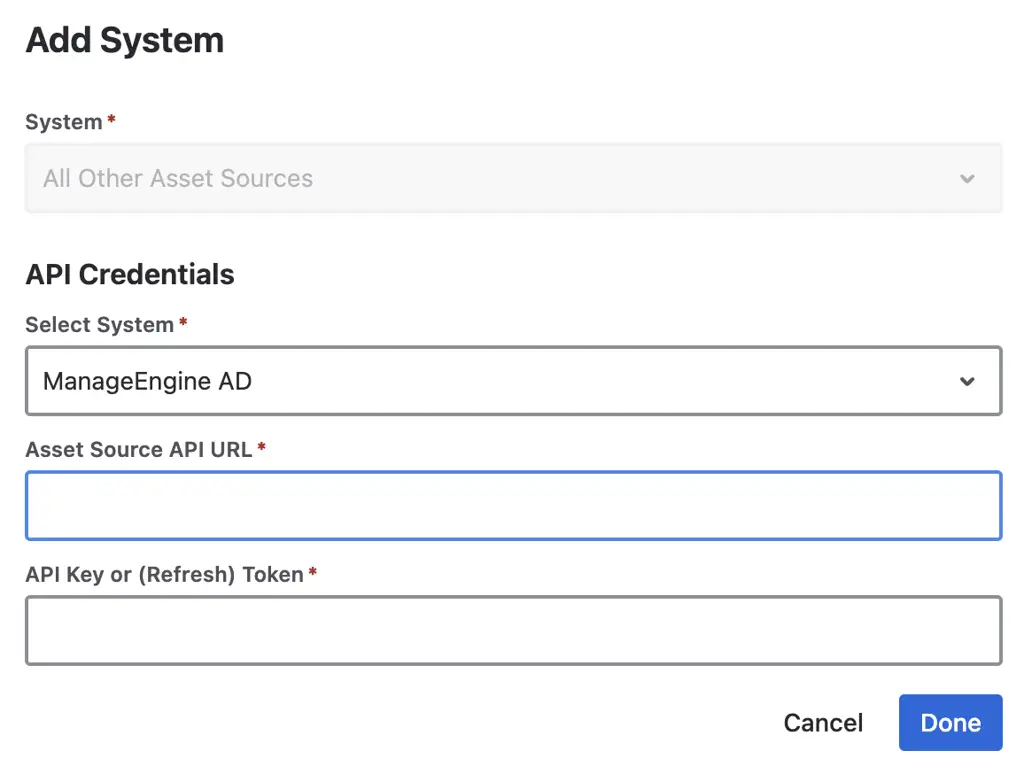
Configure the connection to your AD Manager Plus instance by providing the API endpoint URL and authentication token.
2. Map
Use OnLink's field mapping interface to define how AD Manager Plus user attributes correspond to your Assets object type attributes.
3. Schedule
Set the sync frequency. OnLink runs automatically on your chosen schedule — no manual uploads, no cron jobs to babysit.
4. Sync
OnLink pulls user records from AD Manager Plus, transforms them according to your mapping, and creates or updates objects in Assets.
Connection
You need the “Auth Token” to set this connection. Choose “All Other Asset Sources” and ManageEngine AD to add this connection. URL should be the base URL of your AD Manager Plus API endpoint.
OnLink: API credentials for connecting to ManageEngine ADManager Plus (auth token and base URL).
Mapping configuration
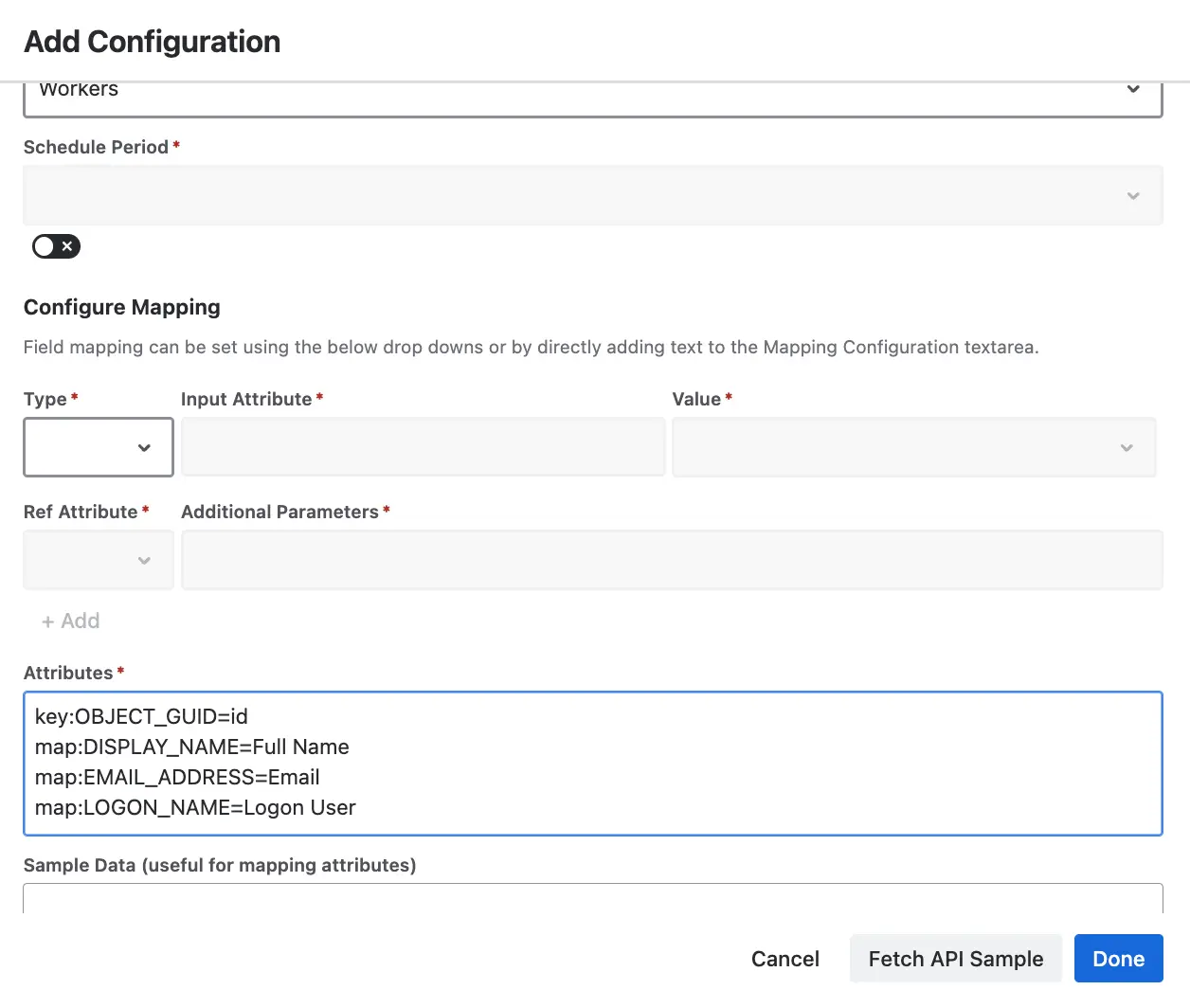
Here’s a breakdown of some of the mapping configuration items:
Key or Map
Description
key:OBJECT_GUID=id
The keyword “key” refers to using id as a unique identifier. This allows OnLink to update the record. “id” is a text attribute.
map:DISPLAY_NAME=Full Name
Maps Display Name to Full Name text attribute
map:EMAIL_ADDRESS=Email
Maps EMAIL_ADDRESS to Email attribute
map:LOGON_NAME=Logon User
Maps LOGON_NAME to Logon user attribute
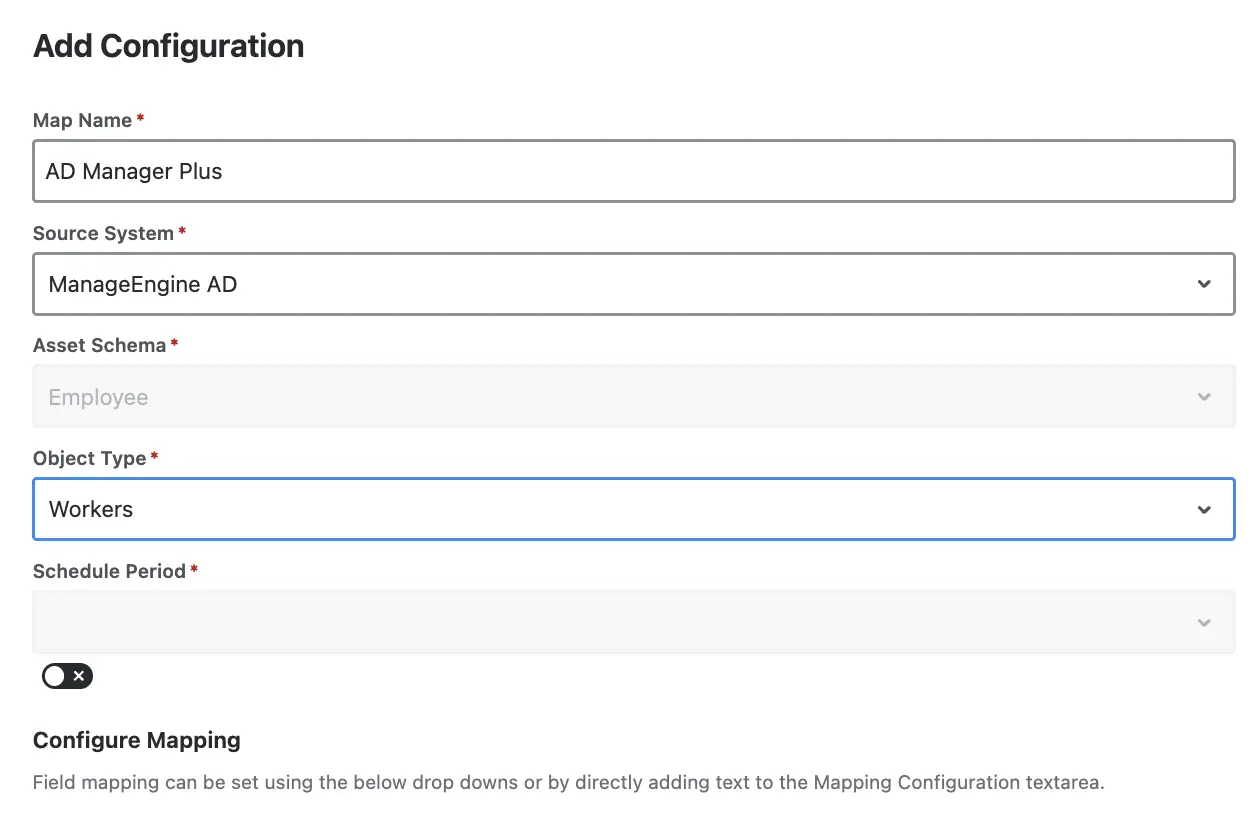
OnLink: import configuration for ADManager Plus users.
OnLink: attribute mapping from ADManager Plus users to JSM Assets.
DocumentationFor detailed, step-by-step configuration instructions — including screenshots and troubleshooting tips — refer to the official OnLink documentation: AD Manager Plus to JSM Assets — OnLink Documentation
The app handles multi-source data imports into Assets well, overcoming gaps in other native solutions. Support has been responsive, and documentation is clear and thorough.
If you're already managing users in AD Manager Plus and delivering services through Jira Service Management, the missing piece is the connection between them. Getting your Active Directory user data into Assets enables a
Does OnLink support two-way sync between Assets and AD Manager Plus?
OnLink is designed to import data from AD Manager Plus into Assets. It operates as a one-way sync — pulling data from AD into your Assets.
How often can I schedule data syncs?
OnLink supports configurable sync schedules. You can run syncs on intervals that match your organization’s needs — from frequent syncs for fast-moving environments to daily or weekly syncs for more stable directories.
Will OnLink create duplicate records in Assets?
No. OnLink uses a unique key to match incoming records against existing objects in Assets. If a match is found, the record is updated. If no match exists, a new object is created.
Which ADManager Plus API does OnLink use?
The Search User REST API (/RestAPI/SearchUser), authenticated with an auth token generated in ADManager Plus. It returns user attributes such as sAMAccountName, display name, department, title, manager, office and employee ID.
Can I bring ManageEngine devices in too?
Yes. ManageEngine Endpoint Central is supported in the same app, so AD users and the computers they own land in one Assets schema and can be linked. All sources.
On this page
AD data in Assets
Start a free trial of OnLink on the Atlassian Marketplace. ADManager Plus is one of 70+ identity, device and HR sources in the same app.