Import CrowdStrike Falcon Data into Jira Service Management Assets
OnLink imports CrowdStrike Falcon host data into Jira Service Management Assets: every device with a Falcon sensor, with hostname, OS, serial number, agent version and last-seen time, plus Falcon Discover applications and unmanaged hosts if you want them.
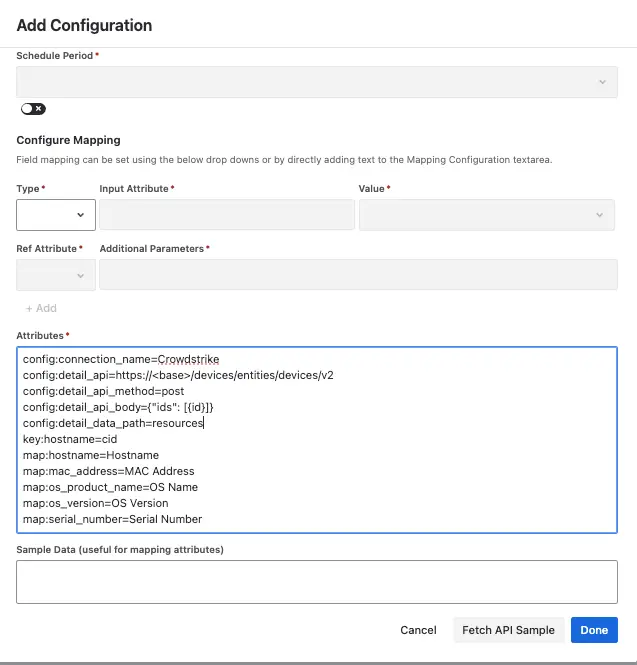
The connection you created in Step 1. Select it from the list.
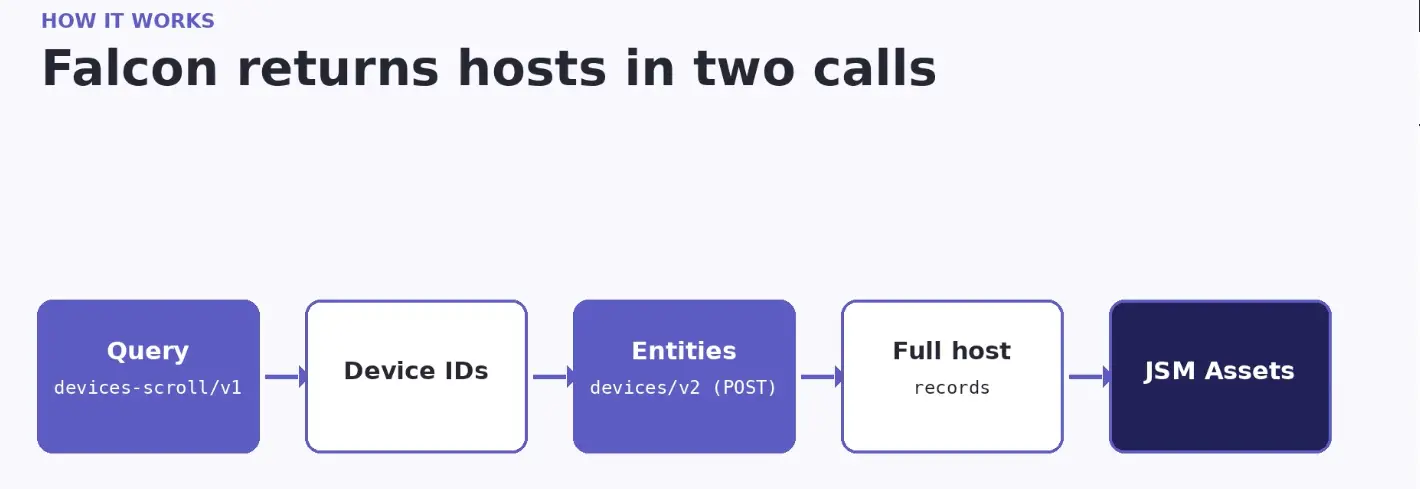
detail_api
The second call that returns full records. Swap it to fetch applications or other objects.
detail_api_method
GET or POST, depending on the endpoint. Falcon's device details use POST.
detail_api_body
The request body. For Falcon this is the ids array.
detail_data_path
The JSON path in the response that holds the records (resources).
Asset field mapping
Use Get Data in OnLink to preview a sample of the Falcon response, then map the JSON fields to your Assets attributes.
Falcon field
Assets attribute
Notes
device_id
Device ID
Key. Falcon's unique host ID. OnLink uses it to decide create vs. update.
hostname
Hostname
mac_address
MAC Address
os_product_name
OS Name
e.g. macOS, Windows 11
os_version
OS Version
serial_number
Serial Number
Handy for matching against HR or device-management data
OnLink: Falcon host fields mapped to Assets attributes, keyed on device_id.
Other useful fields to consider: local_ip, external_ip, platform_name, system_manufacturer, system_product_name, agent_version, last_seen, status, and tags.
Mapping tips
Start with one key: mapping. It’s what keeps re-imports from creating duplicates.
Compare the sample JSON against your object type’s attributes before running the first import. Attribute names are case sensitive.
For nested values, inspect the sample output and use the field path OnLink supports.
Run the import once manually, review the objects, then turn on the schedule.
Sensor coverage gapsImport your MDM (Intune, Jamf Pro, Iru) and Falcon into the same object type keyed on serial number. An Assets filter for objects with an MDM record and no Falcon device_id is your list of endpoints without a sensor.
Why use OnLink for CrowdStrike to Assets
You could write a script against the Falcon API. Then you’d need somewhere to run it, a way to rotate secrets, retry logic for rate limits, and someone to fix it when a field changes. OnLink takes that off your plate.
Native Forge app, nothing on-premise
OnLink runs on Atlassian Forge, inside Atlassian's cloud. No servers, agents, or middleware to install or patch.
Pagination, error handling, retries, and scheduling built in
The integration framework handles these, so you configure an import once and let it run.
Configurable API methods
Import devices, applications, hosts, or any other data object the Falcon API exposes by pointing OnLink at the right endpoint.
Query parameter support
Pass FQL filters, pagination limits, sort order, and other parameters to import only what you need.
Reusable connection templates
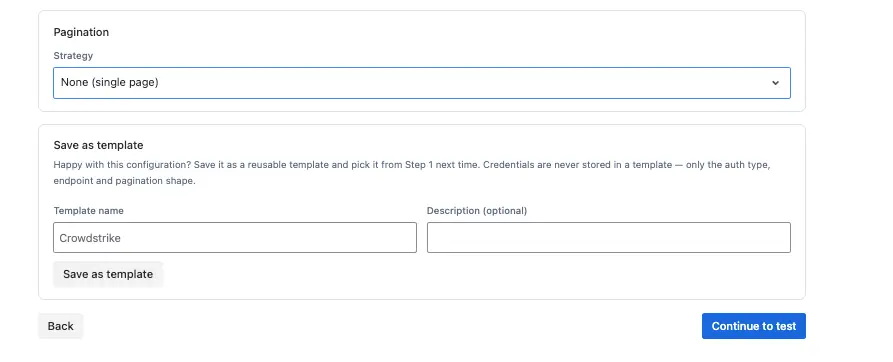
Save a connection as a template and reuse it, e.g. one for your Falcon sandbox and one for production.
The app makes syncing assets so easy but any time I have a question, I put a ticket in and they get me taken care of either with clear direction or a call to walk me through things.
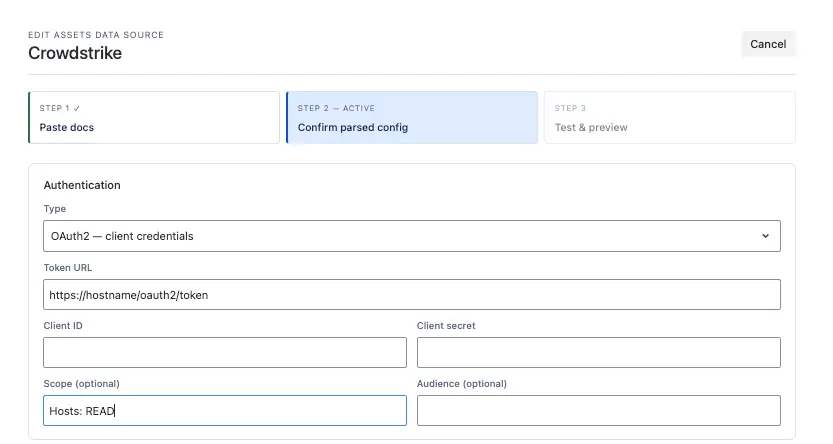
Read-only access is enough. Use Hosts: READ for managed devices. Add Assets: READ if you also want Falcon Discover data such as installed applications, unmanaged hosts, or accounts. OnLink doesn’t need any write scopes.
Can I import only some devices, e.g. Windows servers or one host group?
Yes. Add an FQL filter query parameter to the query call. For example, filter=platform_name:'Windows'+product_type_desc:'Server' imports only Windows servers. You can also use sort and limit to control the order and batch size.
How does OnLink avoid creating duplicate assets?
The key: mapping. OnLink matches each incoming record on the key attribute (we recommend Falcon’s device_id). If a matching object exists it’s updated; if not, a new one is created.
Can I import installed applications as well as devices?
Yes. With the Assets: READ scope, point the query call at /discover/queries/applications/v1 and the detail call at /discover/entities/applications/v1, then map the application fields to an Applications object type. You can link applications to devices using an object reference attribute.
How often does the data sync, and what happens if the API is unavailable?
You set the schedule in OnLink (hourly, daily, or whatever suits your environment). If Falcon returns an error or rate-limits a request, OnLink’s framework retries automatically and logs the result, so a temporary outage doesn’t leave you with a half-finished import
Can Falcon data merge with my MDM or RMM records in Assets?
Yes. Key Falcon on serial_number or hostname into the same object type your Intune, Jamf Pro, NinjaOne or Huntress import uses, and one Assets object shows device management state next to sensor coverage. Hosts that appear in your MDM but not in Falcon are the ones missing a sensor.
How does OnLink compare with Atlassian Data Manager's Falcon adapter?
Data Manager includes a Falcon adapter on JSM Premium and Enterprise. OnLink works on any JSM plan, lets you choose the Falcon endpoints and FQL filters yourself, and sits in the same app as your HR, identity and device sources. See the comparison.
On this page
Falcon data in Assets
Start a free trial of OnLink on the Atlassian Marketplace. CrowdStrike Falcon, Huntress, Dynatrace, your MDM and HR systems, in one app.
Try OnLink on the Atlassian Marketplace and follow the CrowdStrike to JSM Assets guide. Need help with your schema or mappings? Talk to the Onward team. Other security and monitoring sources, Huntress and Dynatrace among them, follow the same pattern.