Microsoft Defender for Endpoint to Jira Service Management Assets: Sync Devices and Alerts with OnLink
When a laptop starts throwing security warnings, the ticket rarely names the laptop and the agent shouldn’t need the Defender portal to find it. OnLink syncs Microsoft Defender for Endpoint devices and alerts into JSM Assets, so every security ticket points at the exact device with its risk score, exposure level and open alerts.
In shortOnLink reads Microsoft Defender for Endpoint through API calls, List machines and List alerts, and syncs devices and alerts into JSM Assets. It reuses the Entra ID app registration you already have for Intune or Entra ID imports.
Why put Defender data in Assets
Security alerts usually live outside the service desk. A requester writes “my laptop keeps showing warnings”, and the agent opens the Defender portal, searches by user and guesses between three devices. With devices and alerts in Assets, that context is on the ticket from the start.
Requesters pick, not describe
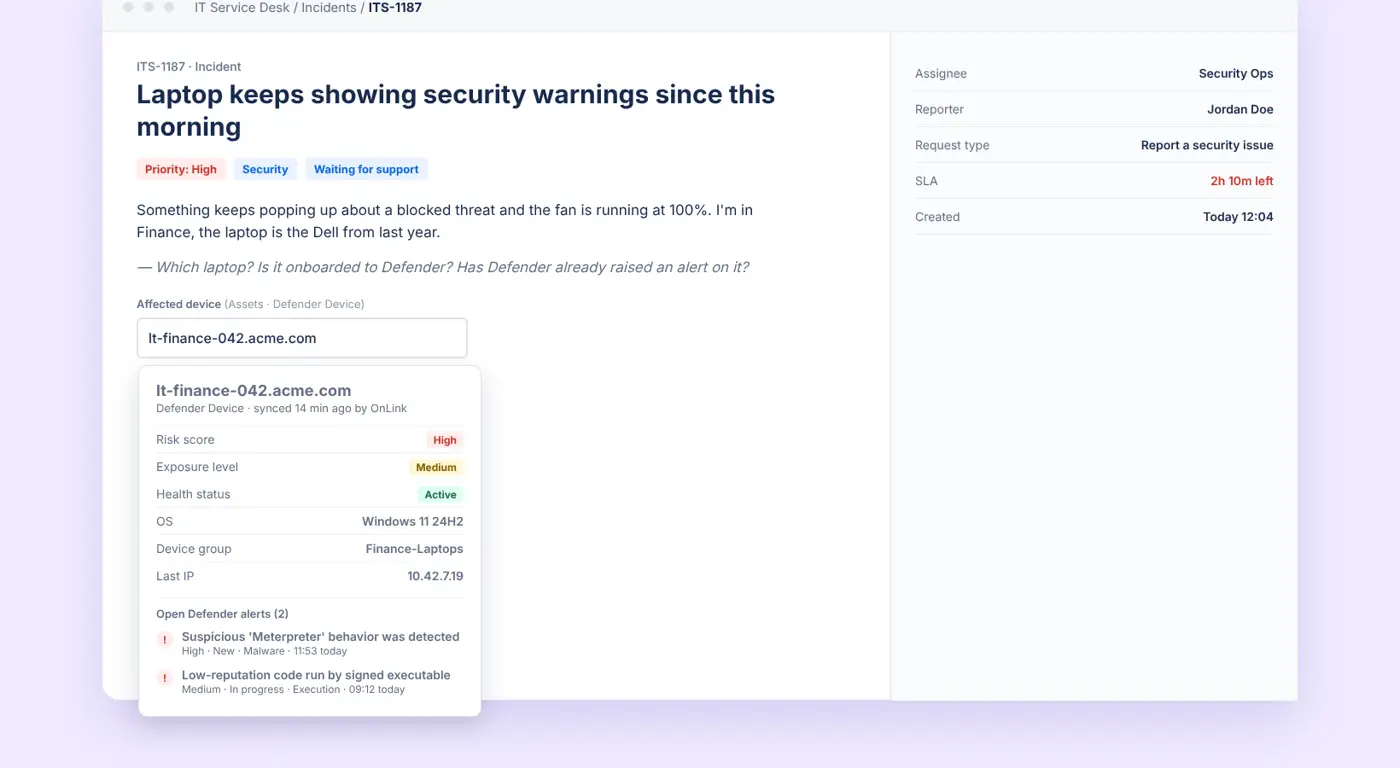
An Assets field on the request form lists your real Defender devices by name, OS and device group.
Risk and exposure on the ticket
Risk score, exposure level, health status, last IP and open alerts show on the incident without a portal trip.
Alerts become tickets
Automation on a new High-severity Defender Alert creates the incident, links the device and routes it to the security queue.
One record per device
Link the Defender object to the Intune, Jamf or Entra ID device you already import, so security posture sits next to ownership and hardware.
What it looks like in Jira Service Management
The requester types part of a device name into an Assets field and picks the exact laptop. The agent sees its risk score, exposure level, health status and the two open Defender alerts, synced minutes ago by OnLink.
Example data. Field names and attributes depend on how you set up your object schema.
See it in 30 seconds
How Defender for Endpoint maps to Assets
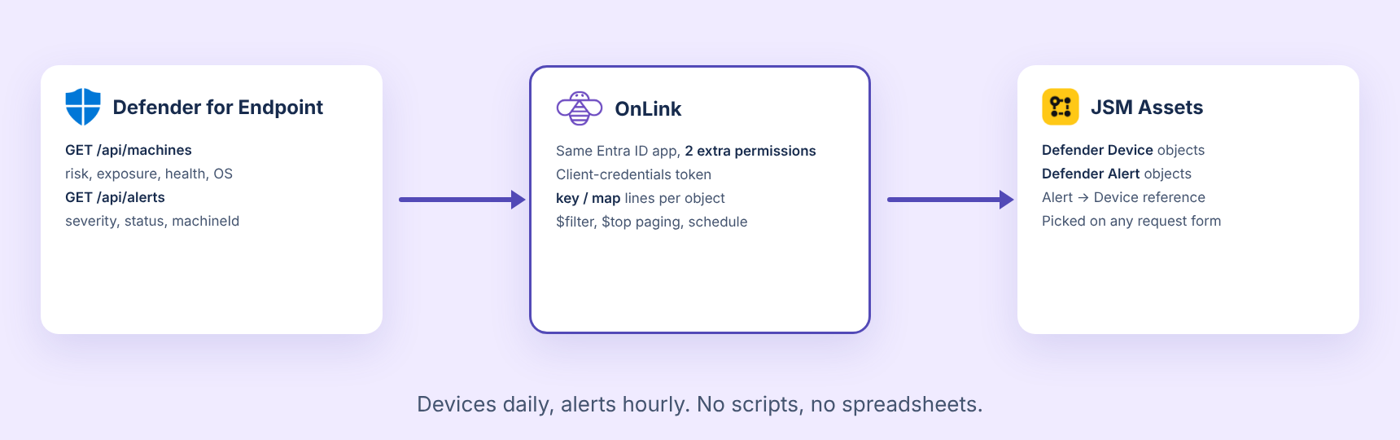
Two API calls become two Assets object types. Defender Device comes from GET /api/machines and is keyed on the Defender machine ID. Defender Alert comes from GET /api/alerts, keyed on the alert ID, with a reference to the device it belongs to. Import devices first so every alert finds its device. If you already import Intune or Entra ID devices, link the Defender object to them by Entra device ID rather than creating a second record.
Defender for Endpoint devices and alerts flow through OnLink into two Assets object types. Click to enlarge.
How it works
Setup comes down to three parts. The setup guide has every field, filter and mapping line.
1
Reuse your Entra ID app, add two permissions
On the app registration OnLink already uses, add the WindowsDefenderATP application permissions Machine.Read.All and Alert.Read.All and grant admin consent. Same tenant ID, client ID and secret. The only change is the token scope: https://api.securitycenter.microsoft.com/.default.
2
Pull devices and alerts with two calls
OnLink calls /api/machines and /api/alerts, pages with $top and $skip (up to 10,000 records a call) and applies server-side $filter conditions, so only onboarded, active devices or only open High and Medium alerts land in Assets.
3
Map fields and schedule the sync
Key devices on the machine ID and alerts on the alert ID, map the fields you want, and reference the device from each alert by machineId. Schedule devices daily (Defender refreshes its full device report about once a day) and alerts hourly.
Sample mapping for devices:
					key:id=Machine ID
map:computerDnsName=Name
map:osPlatform=OS Platform
map:healthStatus=Health Status
map:onboardingStatus=Onboarding Status
map:riskScore=Risk Score
map:exposureLevel=Exposure Level
map:lastIpAddress=Last IP Address
map:rbacGroupName=Device Group
map:aadDeviceId=Entra Device ID
map:machineTags=Tags|arraySeparator=,
map:lastSeen=Last Seen
config:api=/api/machines
No. Add the two WindowsDefenderATP application permissions to the registration OnLink already uses and grant admin consent. Tenant ID, client ID and secret stay the same.
Why does the token use api.securitycenter.microsoft.com when the API is at api.security.microsoft.com?
Microsoft still issues Defender tokens for the legacy securitycenter audience. A token for any other scope, including Microsoft Graph, returns 403 Forbidden even though the calls go to api.security.microsoft.com.
Does this work with Defender for Business or Plan 1?
Yes. List machines and List alerts are available on Defender for Business and Defender for Endpoint Plans 1 and 2.
Can I import vulnerabilities or software inventory too?
Yes. The same connection serves /api/vulnerabilities, /api/software and /api/recommendations. Create another object type and import for each.
What happens to alerts that get resolved in Defender?
Your call. Without a filter they stay in Assets with a Resolved status and a resolvedTime, which is useful for audit. With status ne 'Resolved' only open alerts are imported.
On this page
Defender for Endpoint in Assets
Start a free trial of OnLink on the Atlassian Marketplace.
Try OnLink for Defender for Endpoint to JSM Assets
Your service desk shouldn’t need the Defender portal to know which laptop is affected, how exposed it is, or what alerts are open on it.
OnLink is Cloud Fortified and brings 100+ sources into JSM Assets: HR systems, identity providers, MDMs, cloud platforms, and now Microsoft Defender for Endpoint.