
OnLink now pulls records from any ServiceNow table straight into Assets, with no middleware and no CSV exports.
Many teams run ServiceNow for some IT workflows and Jira Service Management for others. Or they are moving off ServiceNow entirely. Either way, the CMDB data has to live where agents work. OnLink connects to the ServiceNow Table API, fetches the records you choose, and maps each field to an Assets attribute. Re-run the import and existing objects update instead of duplicating.
Keep ServiceNow as a source of truth for some records while JSM agents see them in Assets. Pull computers, servers, virtual machines, or hardware assets on a schedule. Agents can then link those objects to requests, incidents, and changes without switching tools.
Moving from ServiceNow to Jira Service Management? Your CMDB is usually the hardest part to move. OnLink reads CMDB tables such as cmdb_ci_computer and cmdb_ci_server and creates matching objects in Assets. Run it table by table, validate each one, and cut over when the data looks right.
OnLink supports both Basic Authentication and OAuth for the ServiceNow connection. Pick whichever your ServiceNow admin allows.
Method | What you provide in OnLink |
|---|---|
Basic Auth | ServiceNow username and password |
OAuth | Client ID and client secret |
Setup takes three steps:
Access the integration account needs:
rest_api_explorer role, so the account can call the ServiceNow REST Table API.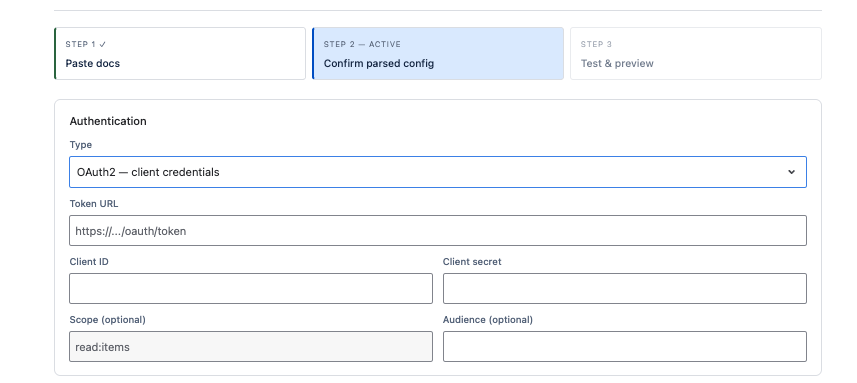
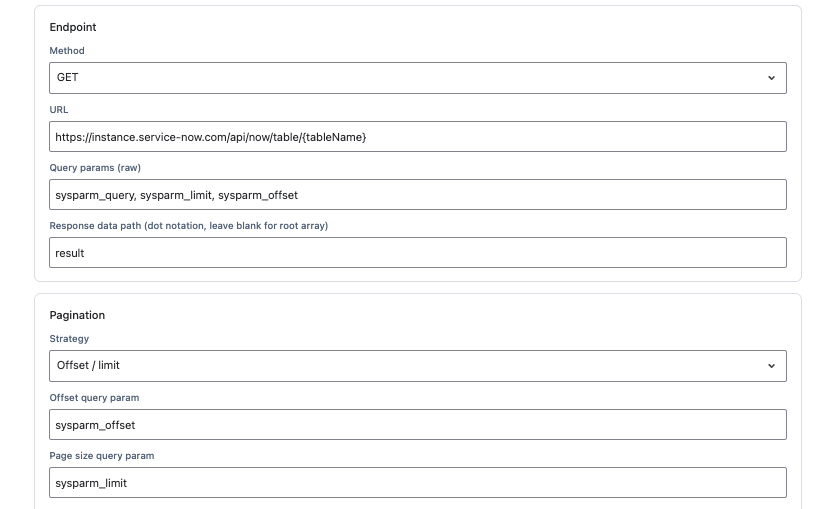
Point OnLink at one ServiceNow table and it fetches every record in it. Configure the API call like this:
GET.result.Swap the table name to import something else. Common choices:
cmdb_ci_computer for laptops and desktopscmdb_ci_server for serverscmdb_ci_vm_instance for virtual machinesalm_hardware for hardware assetsClick Get Data to preview what comes back before you map anything. Each record arrives as JSON with fields like sys_id, name, serial_number, and os.
Each ServiceNow field maps to a JSM Assets attribute with one line of config. A key: line tells OnLink which field uniquely identifies a record, so repeat imports update existing objects. map: lines copy fields into attributes.
OnLink mapping | ServiceNow field | JSM Assets attribute |
|---|---|---|
|
| ID (unique match key) |
|
| Name |
|
| Serial Number |
|
| OS Name |
|
| Status |
|
| Asset Tag |
|
| OS Version |
|
| IP Address |
|
| Expiration Date |
Try OnLink free on the Atlassian Marketplace. Planning a full ServiceNow-to-JSM migration? Book a 30-minute walkthrough and we’ll map your first table with you.
1. Which ServiceNow tables can I import?
Any table the integration account can read through the Table API. Common ones are cmdb_ci_computer, cmdb_ci_server, cmdb_ci_vm_instance, and alm_hardware.
2. What permissions does the ServiceNow account need?
Read-only access to the tables or views you import, plus the rest_api_explorer role. No write access is required.
3. Should I use Basic Auth or OAuth?
Both work. OAuth with a client ID and secret is usually preferred by security teams. Basic Auth is quicker for a proof of concept.
4. Will re-running the import create duplicate objects?
No. The key: mapping, typically sys_id, matches each record to its existing Assets object and updates it.
5. How do I handle reference fields like location or assigned user?
ServiceNow returns these as links and sys_ids. Resolve them to display values, such as a location name or user email, that match objects already in Assets.