
Employees don’t just leave companies. They leave behind a trail of insights that most organizations never collect.
Every departure is a data point. When someone hands in their resignation, they carry with them months or years of unfiltered observations about your culture, leadership, processes, and growth opportunities. Exit surveys are the bridge between that departing knowledge and your organization’s ability to evolve. Yet most companies treat them as a compliance checkbox rather than the strategic goldmine they truly are.
This guide walks you through why exit surveys matter, the mistakes most organizations make, and how to implement a seamless, secure exit survey program using OnSurvey in Workday.
Exit surveys are not just checkbox. When done well, they provide a direct pipeline to honest employee sentiment — the kind of candid feedback that current employees often hesitate to share.
Departing employees have a unique vantage point. They’ve experienced your organization from onboarding through their final day, and they no longer have a stake in internal politics or fear of repercussions. This creates a rare window of honesty. Exit survey data helps management make informed decisions across several critical dimensions.
Identifying systemic issues before they escalate. If three engineers leave in six months and all cite “lack of career progression,” that’s not a coincidence — it’s a pattern demanding action. Exit surveys surface these trends early, before they become full-blown retention crises.
Validating or challenging leadership assumptions. Senior leaders often operate on intuition about what’s working. Exit data introduces objectivity. When a departing sales rep says “I left because my manager micromanaged every deal,” that’s a data point that no engagement survey would capture so bluntly.
Benchmarking the employee experience over time. Consistent exit survey data lets you track whether changes you’ve made — new benefits, revised promotion criteria, flexible work policies — are actually moving the needle.
Reducing future turnover costs. The Society for Human Resource Management estimates that replacing an employee costs six to nine months of their salary. Exit survey insights that prevent even a handful of departures pay for themselves many times over.
Strengthening your employer brand. Employees who feel heard — even on their way out — are more likely to speak positively about the organization. They become alumni advocates rather than detractors on Glassdoor.
OnSurvey brings purpose-built survey capabilities directly into the Workday ecosystem, eliminating the need for third-party tools and the data silos that come with them. Here’s a step-by-step guide to setting up an effective exit survey program.
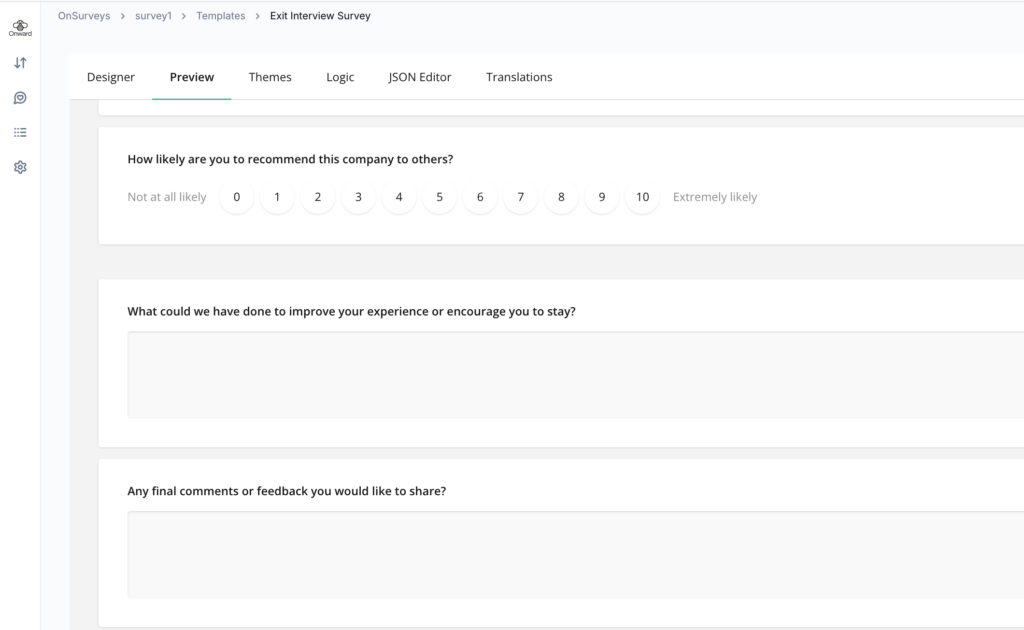
The OnSurvey designer provides a visual interface for building surveys that balance structured data collection with open-ended exploration. The key is designing questions that serve both purposes: giving you quantitative data you can trend over time, and qualitative depth that reveals the “why” behind the numbers.
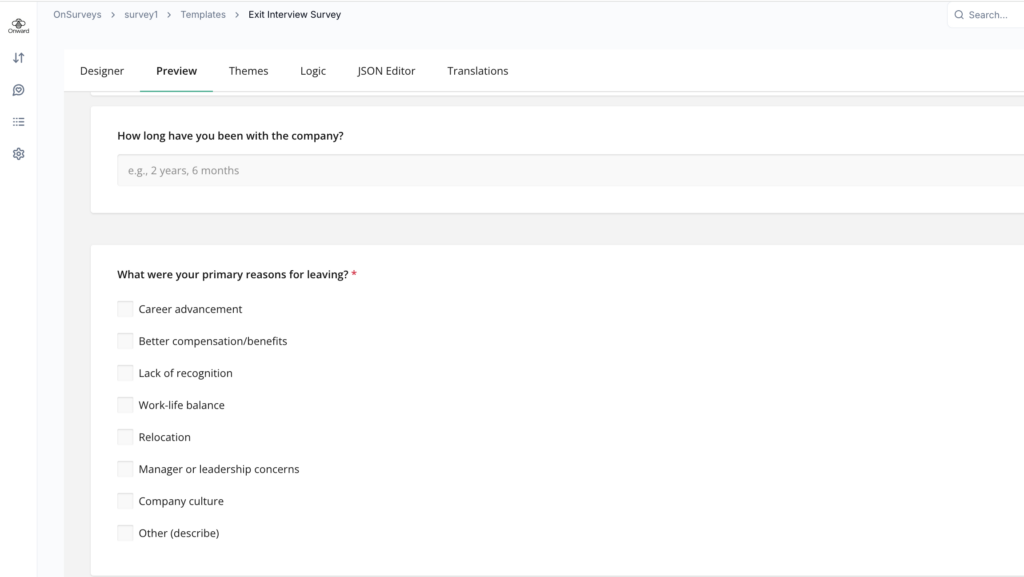
Structured questions for quantitative tracking:
These use rating scales or multiple-choice formats. They’re essential for spotting trends across time periods, departments, or geographies.
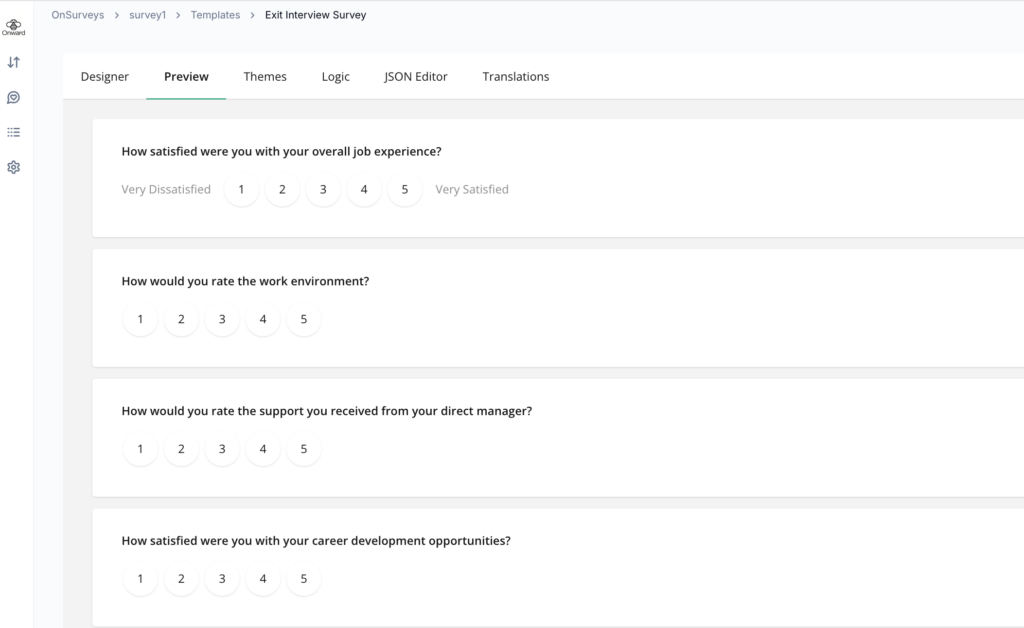
Open-ended questions for qualitative depth:
These capture the nuance that rating scales miss. They give employees permission to share stories, frustrations, and ideas in their own words.
Timing and automation are what separate an effective exit survey program from one that relies on someone remembering to send an email. OnSurvey integrates with Workday’s business process framework to trigger surveys automatically based on workforce events.
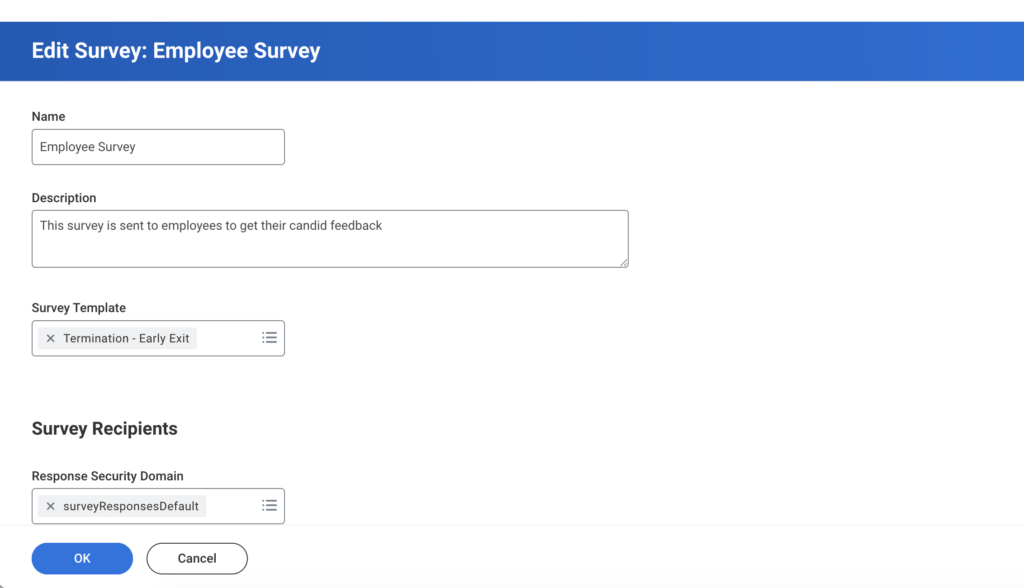
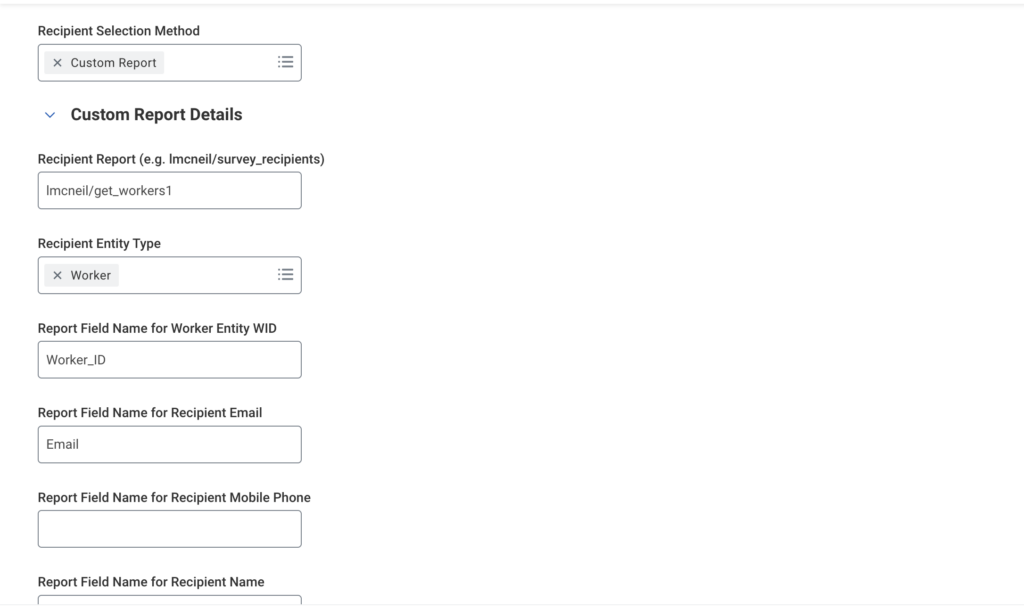
Primary trigger: Voluntary termination event. Configure OnSurvey to automatically dispatch the exit survey when a voluntary termination is initiated in Workday. This ensures no departure slips through the cracks.
Timing delay: Set the survey to send 2-3 business days after the resignation is confirmed. This gives the employee time to process their decision and handle initial transition tasks, but keeps the survey within the window when their experience is still fresh and they’re still engaged enough to respond.
Audience filters: Not every departure warrants the same survey. Consider configuring different surveys or conditional paths based on:
Reminder cadence: Configure automatic reminders — one gentle nudge 3 days after the initial send, and a final reminder 2 days before the survey deadline. OnSurvey lets you customize reminder messaging so it doesn’t feel like a generic system notification.
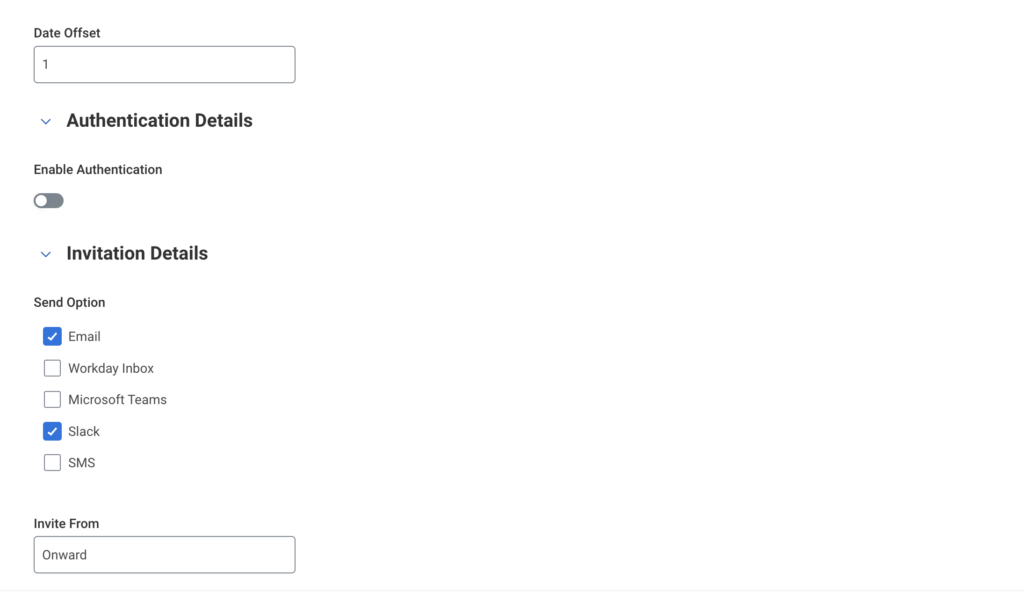
The invitation message is your first (and sometimes only) chance to convince someone to participate. Keep it human, not corporate.
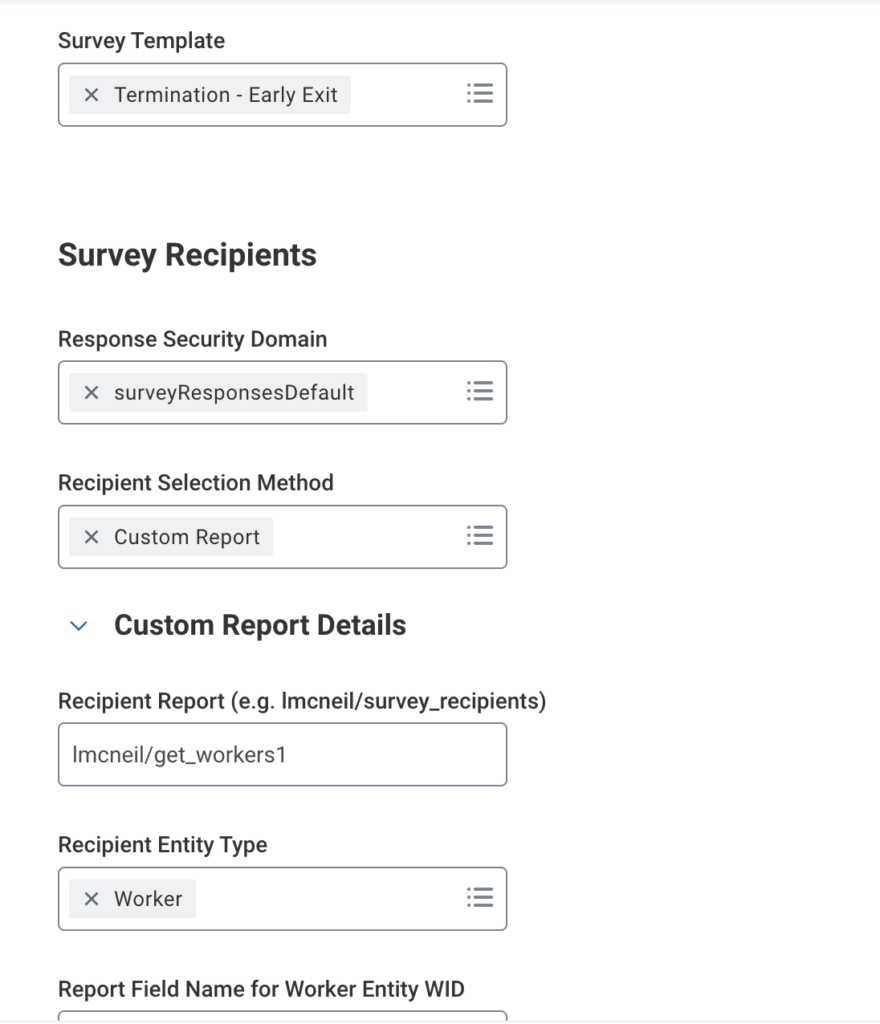
Here’s a practical reality that many implementations overlook: by the time a departing employee gets around to completing the exit survey, they may no longer have access to Workday or internal systems. Their credentials might be deactivated, their laptop returned. OnSurvey addresses this with external access capabilities.
Generate a unique external survey link. OnSurvey can create a secure, tokenized URL that doesn’t require Workday authentication. This link is included in the survey invitation email (sent to the employee’s personal email address on file, not their corporate email that may be deactivated).
Set an access window. The external link should remain active for a defined period — typically 14-21 days from the employee’s last day. After that, the link expires automatically for security.
No VPN required. The external survey renders in any modern browser without requiring corporate network access. This removes the single biggest barrier to post-departure response collection.
Anonymity isn’t just a feature — it’s the foundation of honest feedback. OnSurvey provides configurable anonymity settings that let you balance data richness with respondent privacy.
Full anonymity mode: Responses are completely de-identified. No metadata (name, department, date) is attached to individual responses. Results are available only in aggregate.
Semi-anonymous mode: Demographic attributes (department, tenure band, job family) are attached to responses, but individual identity is stripped. This enables segmented analysis while preserving privacy. OnSurvey enforces a minimum response threshold — for example, results for a segment aren’t displayed unless at least 5 responses exist in that group, preventing deductive identification.
Communicate the anonymity approach clearly. In the survey introduction, state exactly what level of anonymity applies. For example: “Your responses are anonymous. Results will be shared with leadership in aggregate form only. Individual responses cannot and will not be traced to specific employees.”
Allow respondents to optionally identify themselves. Some departing employees want their feedback attributed to them — they want leadership to know exactly who said what. Include an optional field: “If you’d like us to follow up on your feedback or attribute your responses, you may provide your name below. This is entirely optional.”
Collecting exit survey data is only valuable if the right people can access it in the right way. OnSurvey provides secure, role-based sharing directly within Workday — no exporting to spreadsheets, no emailing raw data, no shadow copies floating around.
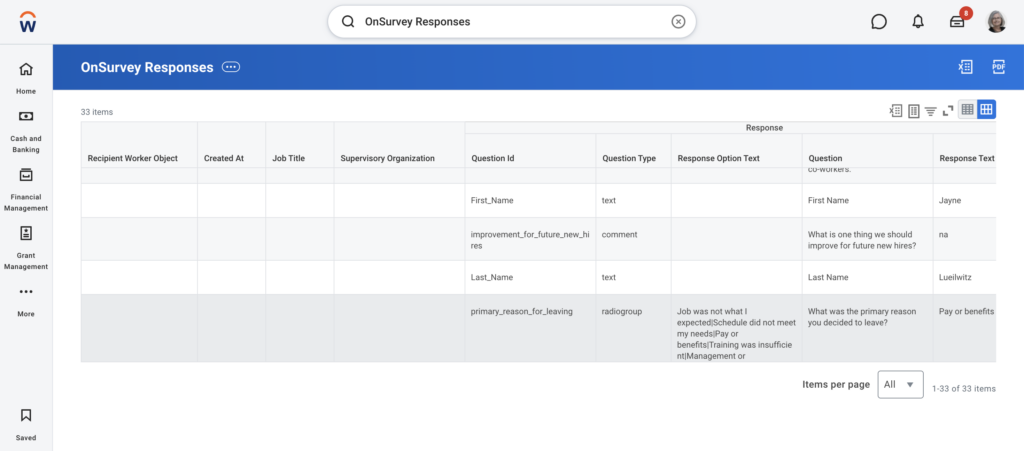
HR Business Partners: Full access to aggregate results for their business units. Can view trend data, response rates, and thematic analysis. Cannot view individual responses in anonymous mode.
People Managers: Access to aggregate results for their organization, but only when minimum response thresholds are met. This prevents a manager from deducing who said what when only one person on their team has left recently.
Senior Leadership: Access to company-wide and division-level dashboards with executive summaries. Focus on strategic themes and trend lines rather than individual data points.
Survey Administrators: Full platform access for configuration, troubleshooting, and data integrity monitoring. Bound by data handling agreements.
Aggregate before you share. Always present exit data in aggregate form. Instead of “Employee X said their manager was terrible,” present “32% of departing employees in Q1 rated manager support below 3 out of 5.”
Create a quarterly exit insights report. Use OnSurvey’s reporting tools to generate a structured summary: overall response rate, top reasons for leaving, sentiment trends, department-specific findings, and recommended actions.
Protect the data pipeline. Exit survey data lives within Workday’s security framework. This means it benefits from the same encryption, audit logging, and access controls as all other sensitive employee data. No need to export to external tools.
Let’s be realistic — departing employees have little institutional motivation to fill out a survey. They’ve made their decision, they’re moving on, and your survey is competing with farewell lunches, knowledge transfers, and the mental shift toward their next role. Here’s how to move the needle on response rates.
The most effective incentive isn’t a gift card — it’s the genuine belief that their feedback will matter. In your survey invitation, be specific about how past exit feedback has driven changes. For example: “Last year, exit survey feedback led us to revamp our promotion criteria and introduce a mentorship program for mid-level engineers.” When employees see that feedback leads to action, they’re far more likely to invest the time.
Keep the survey under 10 minutes. Say so in the invitation. And mean it — don’t promise 10 minutes and deliver 25. A shorter survey that gets completed is infinitely more valuable than a comprehensive one that gets abandoned halfway through.
Some people prefer clicking through rating scales on their phone. Others want to type paragraphs on a laptop. OnSurvey’s external access works across devices, so departing employees can respond whenever and however it’s convenient — on the train home, from their couch, during a coffee break at their new job.
While feedback should never be “bought,” a modest gesture acknowledges the employee’s time. Options include a donation to a charity of their choice in their name, a brief personal thank-you note from their HRBP, or early access to alumni network benefits. The key is making it feel like gratitude, not a transaction.
Don’t send the survey on their last day when emotions are running high and logistics are hectic. The sweet spot is a few days into their notice period — or 3-5 days after their last day if using external access. They’ve had time to decompress but the experience is still vivid.
Exit surveys will surface uncomfortable truths. A departing employee might describe a toxic team dynamic, call out a specific leader’s behavior, or express deep frustration with decisions that felt unfair. How your organization responds to this feedback — internally and in follow-up — defines whether your exit survey program builds trust or erodes it.
When reviewing difficult feedback, resist the urge to immediately defend, explain, or rationalize. The first step is always to acknowledge the experience as the employee lived it. Their perception is their reality, and dismissing it — even internally — prevents learning.
One scathing review isn’t necessarily a pattern. But if you see the same theme echoed across multiple departures, that’s a signal that demands attention. Look for convergence in the data before escalating to leadership.
If a departing employee has opted out of anonymity and shared particularly detailed feedback, consider a brief, empathetic follow-up. Not to argue or defend, but to acknowledge: “Thank you for sharing this. We’re taking it seriously and exploring how to address the concerns you raised.” This gesture costs nothing and can turn a negative departure into a bridge you might cross again.
Some of the toughest exit survey data will be about specific leaders. Present this data constructively, framed around patterns rather than individual quotes. Partner with leadership development or executive coaching to create action plans. The goal is growth, not blame.
When exit survey themes inform organizational changes, tell your current employees. A quarterly update like “Based on recent feedback, we’re investing in manager training focused on career development conversations” signals that the organization listens and acts — which, in turn, encourages future departing employees to participate.
Here’s how the entire process flows in practice, from an employee’s resignation to leadership acting on insights.
1. Resignation is entered in Workday. A manager or HR initiates a voluntary termination for the departing employee. Workday’s business process kicks off.
2. OnSurvey trigger fires automatically. Based on your configured conditions, OnSurvey detects the termination event and queues the exit survey for delivery — with the appropriate timing delay (e.g., 3 business days).
3. The employee receives the survey invitation. An email arrives at their personal email address with a personalized message, clear confidentiality assurance, and a secure external link.
4. The employee completes the survey on any device. Using the external link, they access the survey from their phone, tablet, or personal laptop — no Workday login required. They answer a mix of structured and open-ended questions. The whole thing takes under 10 minutes.
5. Responses are captured and anonymized. OnSurvey processes the submission, applies the configured anonymity settings, and stores the data securely within Workday’s infrastructure.
6. Dashboards update in real time. HR Business Partners and survey administrators see updated aggregate metrics as responses come in — response rates, sentiment scores, emerging themes.
7. Quarterly insights are compiled and shared. At the end of each quarter, HR generates a structured report using OnSurvey’s analytics: top departure reasons, sentiment trends, department-level comparisons, and specific recommendations for leadership.
8. Leadership takes action. Based on the data, concrete initiatives are launched — revised compensation bands, new management training, improved onboarding, flexible work policies — whatever the data points to.
9. The loop closes. Changes are communicated to the organization, reinforcing the message that feedback drives improvement. The next departing employee is more likely to complete their survey because they’ve seen the cycle in action.
Employee departures are inevitable. What’s not inevitable is losing the insights that come with them. A well-designed exit survey program — powered by OnSurvey in Workday — transforms routine offboarding into a continuous feedback loop that strengthens retention, improves leadership, and evolves your employee experience.
The building blocks are straightforward: thoughtful survey design, automated and well-timed triggers, external access with genuine anonymity, and secure sharing that puts insights into the hands of decision-makers. The differentiator is execution — and the commitment to act on what you learn.
Ready to turn every departure into your organization’s next improvement?
Try OnSurvey today and see how to implement exit surveys using OnSurvey.